




eBay Report Seller is a powerful tool that helps sellers run a successful eBay store. Running a store takes more than just posting products—it requires tracking performance, understanding customer behavior, and making smart business moves. That’s exactly what this tool delivers.
With clear data on sales, inventory, and buyer activity, sellers get the insights they need to boost profits and grow their online business.
Keynotes
- Track sales trends easily with the eBay Report Seller tool.
- Identify top-selling products and categories for higher profits.
- Understand customer behavior to create better marketing strategies.
- Monitor inventory levels to prevent stockouts or overstocking.
- Save time with PlugBooks by automating eBay reports and syncing with QuickBooks/Xero.
1. What Makes eBay Report Sellers Essential for Online Stores?
It’s not enough to just put items in an eBay store; you also need to know how well they do. The eBay Sales & Seller Insights feature gives you a lot of information about sales patterns, how your inventory is moving, and how your customers act.
It helps sellers optimize listings, increase profits, and even report ebay seller issues when needed, creating a safer marketplace.Along with performance data, sellers should also understand their eBay sales fees and charges to maximize profitability.

2. Steps to Access eBay Report Seller Quickly
Accessing reports is simple:
- Log in to eBay Seller Hub.
- Go to Performance → Reports.
- Select the report type—sales, inventory, or order history.
- Download or view online.
Regular review ensures timely decisions. If needed, you can also report eBay directly from this dashboard for disputes or violations.
3. Key Metrics Every eBay Seller Should Track
The eBay Seller Analytics function lets you keep track of:
- Find out which products sell the most.
- Top categories: Focus on things that make money.
- Customer behavior: Know how people shop so you can market to them.
- Moving inventory: Don’t run out of stock or have too much on hand.
These numbers can assist you decide when to report a seller on eBay for behavior that seems shady or against the rules. And if you ever need to find a seller on eBay, having these insights makes the process even easier and more reliable.
4. Benefits of Using eBay Report Seller Effectively
Using these reports empowers sellers to:
- Optimize product listings for higher visibility.
- Plan promotions for slow-moving inventory.
- Improve customer satisfaction through insights.
- Track business growth accurately.
- Quickly report ebay seller issues when necessary.

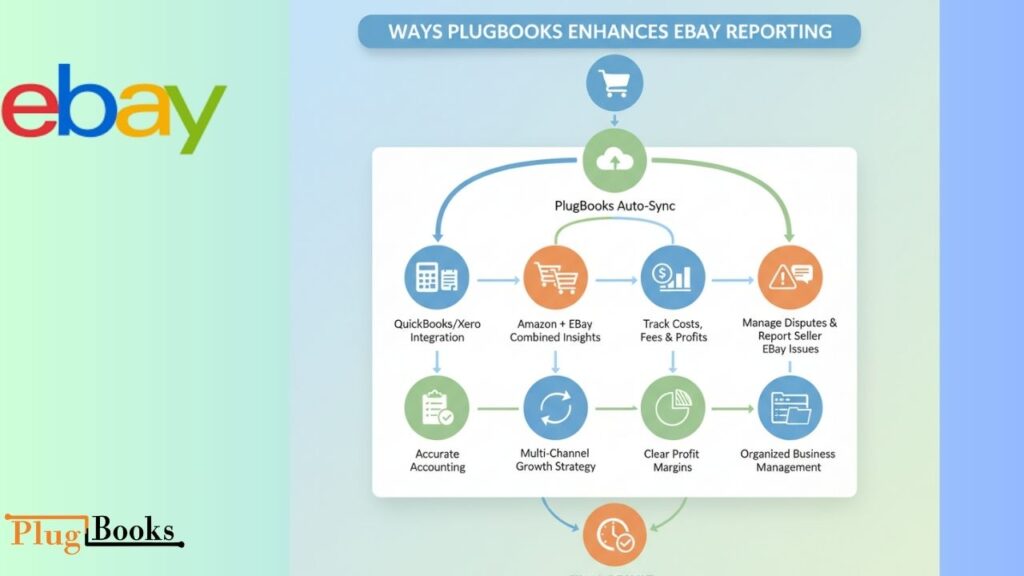
5. Ways PlugBooks Enhances eBay Reporting Experience
Tracking reports by hand takes a lot of work, but PlugBooks makes it easy:
- Automatically sync eBay sales with QuickBooks or Xero.
- Get information from more than one site, including Amazon and eBay.
- Keep track of costs, fees, and earnings on their own.
- Manage disputes or report seller eBay issues in one place.
PlugBooks makes sure that reports are well-organized, correct, and useful, which saves time and cuts down on mistakes. With features like fee tracking and eBay fee calculators, sellers can make smarter decisions effortlessly.
6. Tips to Maximize Insights from eBay Seller Analytics
- Set up weekly or monthly reports.
- To find patterns, look at how current sales compare to sales from previous periods.
- Use PlugBooks to check if your finances are correct.
- Look at inventory that isn’t selling and plan sales.
- Look at how customers act to make your listings better.
- If a seller breaks eBay’s rules, don’t be afraid to report them.
7. Real-Life Experience Gained from Utilizing eBay Report Seller
A lot of sellers see big changes after using eBay Business Report for Sellers. One vendor found out that certain items sold faster on weekends. By using this information along with PlugBooks’ automated reporting, they were able to improve their inventory, change their promos, and increase their weekly sales by 15%.
These kinds of reporting systems do more than just keep track of numbers; they give you useful information that helps you make better choices.
Final Thoughts
The eBay Business Report for Sellers feature shows you how to sell better. When you use it with PlugBooks, it automates reporting, maintains track of revenues, and makes sure your store runs smoothly. These reports can help you find trends, and if you see any problems with an eBay seller, don’t hesitate to report them to keep your business safe and successful.
FAQs
- What is eBay Report Seller?
It’s a tool in Seller Hub that provides insights on sales, inventory, and customer activity. - How can I report a seller on eBay?
Use the “Report a Seller” option to flag suspicious or policy-violating activity. - Can PlugBooks integrate with eBay reports?
Yes, PlugBooks syncs eBay sales data for accounting, profit tracking, and multi-channel insights. - What metrics can I track with the eBay Seller Reporting Tool?
Sales trends, top products, customer behavior, and inventory movement. - How often should I review eBay reports?
Weekly or monthly to identify trends and make informed decisions. - Can I report seller eBay issues directly from my dashboard?
Yes, Seller Hub allows you to flag problems and report violations easily.
7. Why should I use eBay Report Seller with PlugBooks?
It automates reporting, simplifies accounting, and helps make data-driven decisions.
