




You log in to Seller Central and see strong sales with orders flowing consistently, yet your payout appears smaller than expected. This is the moment many sellers first encounter Account Level Reserve Amazon.
Instead of assuming Amazon has deducted money or applied a hidden fee, it’s important to understand what is actually happening behind the scenes and why a portion of your funds may be temporarily on hold.
In this guide, you’ll learn:
- What Account Level Reserve Amazon really means
- Why Amazon places a hold on funds
- How it affects your working capital
- Smart ways to plan around it
- How PlugBooks helps you track everything accurately
If you want stable Amazon growth in 2026, this is not optional knowledge.
What Is Amazon Account Level Reserve?
The Simple Definition
Account Level Reserve Amazon is a temporary hold placed on a portion of your seller balance.
Amazon keeps this reserve to cover potential future liabilities such as:
- Customer refunds
- Returns
- A-to-Z Guarantee claims
- Chargebacks
- Performance-related risks
It is not a penalty.
It is not a permanent deduction.
It is a timing delay of your funds.

Why Amazon Holds Seller Funds
Amazon operates on a customer-first model. That means buyer protection comes first.
If a customer files a refund or dispute after receiving a product, Amazon needs to ensure funds are available to resolve it.
Instead of chasing sellers later, Amazon pre-holds a calculated amount.
This system protects:
- Buyers
- The marketplace
- Amazon’s financial risk
Types of Reserve Structures
Understanding the type of reserve applied to your account helps you forecast payouts better.
Rolling Reserve
Funds are held for a specific period after delivery confirmation.
For example, if an item is delivered today, payment might be released 7–14 days later.
This is the most common structure.
Minimum Balance Reserve
Amazon may require you to maintain a minimum balance at all times.
If your account falls below that amount, your payout is adjusted.
Performance-Based Dynamic Reserve
This changes depending on:
- Return rate
- Order defect rate
- Account health
- Selling history
New sellers and high-growth accounts are more likely to experience dynamic reserves.
How Account Level Reserve Amazon Impacts Cash Flow
This is where real business pressure begins.
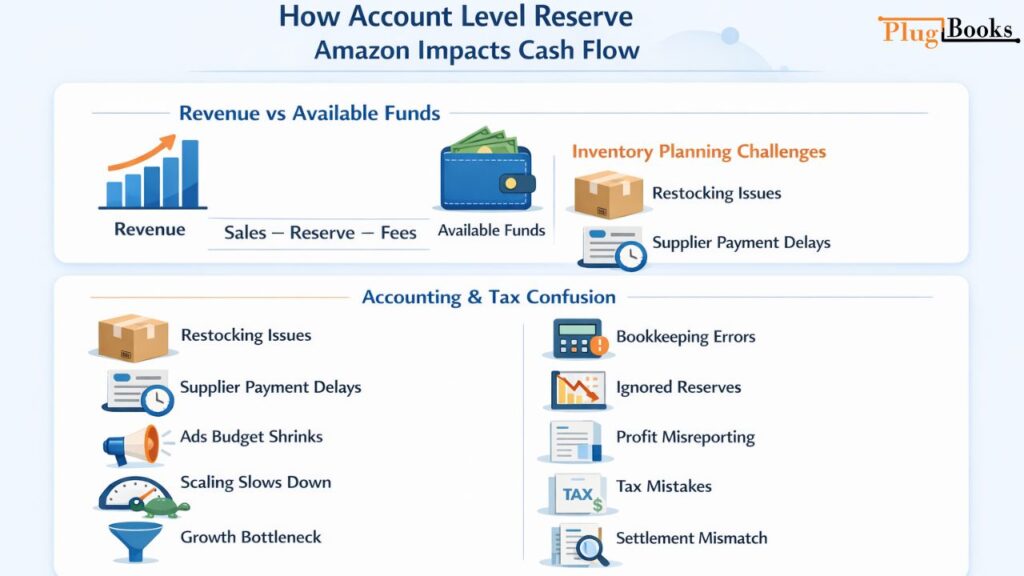
Revenue vs Available Funds
Many sellers confuse revenue with accessible cash.
Revenue = Total sales
Available Funds = Sales – Reserve – Fees
If you plan inventory purchases based only on revenue numbers, you risk a cash crunch.
Inventory Planning Challenges
When funds are held:
- Restocking becomes difficult
- Supplier payments may delay
- Ads budget shrinks
- Scaling slows down
This creates a dangerous growth bottleneck.
Accounting & Tax Confusion
Another major issue is bookkeeping errors.
Common mistakes include:
- Recording full settlement as income
- Ignoring held reserves
- Misreporting profit margins
- Incorrect tax reporting
Without separating reserve amounts properly, your books won’t match Amazon’s settlement reports.
This is one of the biggest silent problems Amazon sellers face
Where to Check Account Level Reserve Amazon?
Follow these steps inside Seller Central:
- Go to Reports
- Click Payments
- Open Transaction View
- Review the Reserve Balance section
You’ll find:
- Current reserve amount
- Total balance
- Available balance
- Upcoming payout schedule
Always analyze these separately before making business decisions.
How to Reduce Reserve Risk
While you cannot directly request removal of Account Level Reserve Amazon, you can influence risk factors.
Improve Account Health Metrics
Maintain:
- Low Order Defect Rate
- Timely shipments
- Positive feedback
Lower Return Rate
You can reduce returns by:
- Accurate product descriptions
- Quality control checks
- Realistic product images
- Clear sizing and usage instructions
Maintain Stable Sales Growth
Sudden spikes in sales sometimes increase perceived risk.
Consistent growth signals reliability.
Smart Financial Strategy for Amazon Sellers
Understanding the reserve is step one.
Planning around it is step two.
Build a 60-Day Working Capital Buffer
Never depend on one settlement cycle.
Keep enough capital to handle:
- Inventory purchase
- PPC campaigns
- Operational costs
- Unexpected reserve increases
Forecast Real Available Cash
Before spending, calculate:
Available balance – Expected reserve hold – Upcoming fees
This prevents overcommitment.
Track Reserve Separately in Accounting
Your accounting system must clearly distinguish:
- Gross sales
- Amazon fees
- Reserve held
- Released reserve
Without this clarity, financial reports become misleading.

How PlugBooks Solves the Reserve Tracking Problem
This is where many Amazon sellers struggle.
PlugBooks helps by:
✔ Automatically syncing Amazon settlement reports
✔ Separating available balance and reserve
✔ Tracking payout timelines
✔ Providing accurate profit calculation
✔ Preventing reconciliation errors
✔ Giving real cash flow visibility
Instead of guessing your real numbers, you get clarity and confidence.
For scaling sellers, this difference is massive.

FAQs
1. Can Account Level Reserve Amazon delay business expansion?
Yes. If reserve increases unexpectedly, it can limit your ability to invest in ads, bulk inventory, or new product launches.
2. Does Amazon notify sellers before increasing reserves?
Not always directly. Often, reserve adjustments happen automatically based on performance metrics without manual notification.
3. Can high refund season increase reserves temporarily?
Yes. During high return periods like holidays, Amazon may increase reserve exposure to manage marketplace risk.
4. Is reserve calculation the same for FBA and FBM sellers?
No. Risk models differ slightly because fulfillment responsibility affects refund and claim probability.
5. Should reserves be recorded as expense in accounting?
No. It is not an expense. It is a temporary liability or held receivable and should be tracked separately.
6. Can reserves affect business valuation?
Indirectly yes. Poor cash flow visibility due to reserve mismanagement can distort financial statements, affecting valuation discussions.
Quick Recap
- Account Level Reserve Amazon is a temporary fund hold
- It protects against refunds and claims
- It affects cash flow, not total revenue
- Poor tracking creates accounting issues
- Smart sellers plan around reserve timing
- PlugBooks simplifies settlement and reserve tracking
Final Thoughts:
Understanding Account Level Reserve Amazon is essential for maintaining healthy cash flow and long-term stability in your Amazon business. It’s not a penalty, but a timing mechanism that can quietly impact inventory planning, supplier payments, and profit visibility if not tracked properly.
Sellers who separate revenue from available funds and monitor reserves accurately make smarter financial decisions and scale with confidence. With the right planning — and tools like PlugBooks to keep settlements clear and organized — you can avoid cash flow surprises and grow your business strategically.