




In 2026, eBay Seller Hub has become an essential tool for eBay sellers, providing advanced management features, real-time data, and tools tailored for state tax regulations. Whether you’re a seasoned seller or just starting out, understanding how to optimize Seller Hub and leverage state-specific features is key to boosting business performance.
This guide will explore everything you need to know about the platform in 2026: from optimizing listings and tracking performance to ensuring compliance with local sales regulations.
Key Takeaways:
- Centralized dashboard for managing sales, listings, and customer interactions.
- AI-driven tools for automating listings and pricing strategies.
- Efficient management of state taxes and sales compliance.
- Insights for data-driven decision-making.
- Integration with third-party tools like QuickBooks.
What is eBay Seller Hub?
eBay Seller Hub is a powerful platform that enables sellers to manage every aspect of their eBay business. It consolidates features like sales tracking, performance metrics, inventory management, and customer service into one seamless interface.
In 2026, Seller Hub was upgraded to include AI-driven insights and better integration with third-party tools, like QuickBooks and Xero, to streamline operations.
Additionally, it simplifies compliance with state regulations, particularly sales tax and shipping laws, making it easier for sellers to stay compliant.
Key Features of eBay Seller Hub in 2026
1. Simplified Listings and Inventory Management
Managing your inventory has never been easier:
- Bulk Editing: Quickly edit multiple listings.
- Stock Sync: Sync inventory across platforms like Amazon and Shopify.
- AI Pricing Suggestions: Get pricing recommendations based on market trends.
Sales Tax Management: Automate sales tax collection based on state laws, track liabilities, and generate reports through QuickBooks.
2. Performance Analytics
Track your store’s performance with more advanced tools:
- Sales Metrics: View detailed reports on sales and performance.
- Conversion Tracking: See which listings are converting the most.
- Buyer Behavior: Understand traffic patterns and state-specific preferences.
Use these insights to make better business decisions.
3. Marketing Tools
Seller Hub offers powerful marketing features:
- Promotions Manager: Run discounts and bundle offers.
- State-Targeted Ads: Run ads based on location to increase visibility.
- A/B Testing: Optimize listings with different titles, images, and descriptions.
4. Customer Service Features
Managing customer service is simple:
- Messaging System: Organize customer communications.
- Automated Responses: Save time with templates for frequent inquiries.
- Case Management: Resolve disputes and returns quickly.

Essential eBay Seller Hub Tools for Managing Listings, Orders, and Performance
Seller Hub tools help sellers manage listings, monitor orders, review sales performance, track payouts, and access business reports. These features simplify daily operations and help sellers make informed decisions.
How to Use the eBay Refurbished Program Dashboard to Track Seller Performance
Eligible eBay Refurbished Program sellers can use the dashboard in Seller Hub’s Performance section to review monthly transaction metrics and check program requirements. The Transactions tab also provides downloadable transaction data for performance monitoring.
How to Use Selling Hub Effectively
1. Getting Started
- Sign in to Selling Hub from My eBay.
- Customize your dashboard to display essential tools.
- Set up shipping preferences, inventory sync, and payment settings.
2. Managing Listings
- Use bulk upload and optimization tools for faster listing creation.
- Let AI tools adjust prices automatically based on competition.
3. Leveraging Data
- Track traffic and conversion rates to optimize listings and pricing.
Managing State-Specific Sales and Taxes
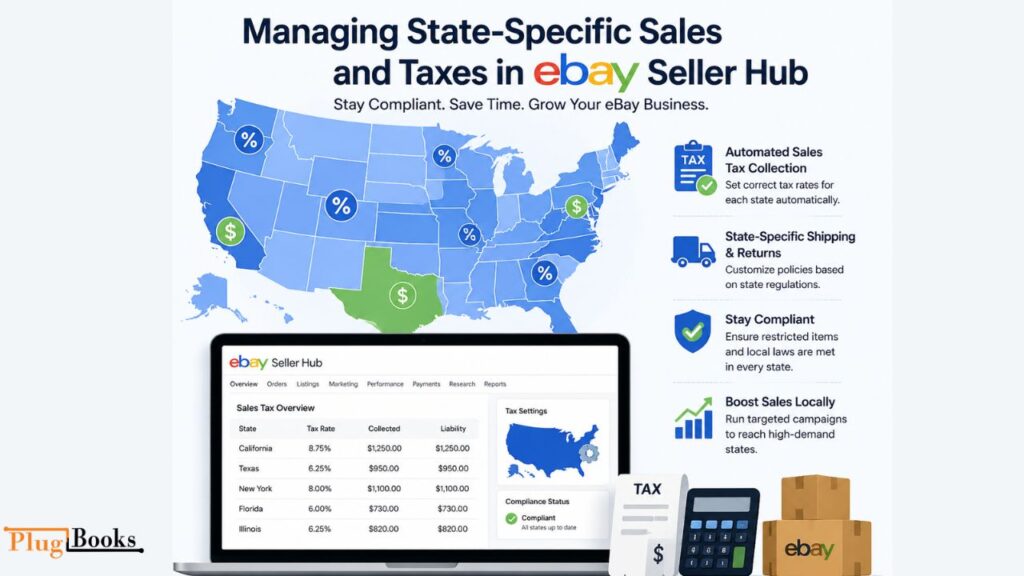
Understanding and managing state sales tax laws is critical for eBay sellers, especially with the updates in 2026. Fortunately, Seller Hub offers tools to help you navigate and ensure compliance with local tax regulations.
1. State Sales Tax Collection
- Set up automated sales tax collection for each state.
- Monitor tax liabilities through the dashboard, integrated with QuickBooks for easy tax reporting.
2. Shipping and Return Policies
- Set state-specific shipping rules to comply with regional restrictions.
- Customize return policies based on state laws for products like age-restricted items.
3. Restricted Products
- Some products, like self-defense items, have state-specific regulations. Seller Hub helps by:
- Flagging restricted products.
- Using compliance tools to ensure your listings meet local laws.
4. Local Marketing
- Use state-targeted advertising campaigns to reach the right customers.
- Test different promotions to find what works best in each region.
How PlugBooks Helps with State-Specific Accounting
Managing state sales tax across multiple regions can be a challenge. PlugBooks integrates with Seller Hub to automate tax calculations, generate reports, and simplify compliance.
- Automatic Sales Tax Calculation for each state.
- Generate state-specific tax reports for easier filing.
- Integration with QuickBooks for financial tracking.

Conclusion
As eBay Seller Hub continues to evolve in 2026, it remains an essential tool for sellers. The state-specific tax management and customer service tools make it even easier to grow your eBay business while ensuring compliance with local regulations. By leveraging AI insights and automating key processes, sellers can focus on scaling their businesses more efficiently.
Frequently Asked Questions (FAQs)
What makes the eBay Seller Platform essential for sellers in 2026?
The Seller Platform consolidates all the necessary tools into one interface, simplifying the management of listings, performance tracking, and ensuring compliance with state-specific regulations. This centralization improves overall business efficiency.
How can I improve my sales performance using eBay’s Seller Dashboard?
Leverage performance analytics to track important metrics, fine-tune your pricing strategies, and enhance listings using AI-driven insights. By understanding customer behavior and sales patterns, you can boost conversions and increase sales.
Can I manage multiple eBay stores with the Seller Center?
Yes, the Seller Center allows you to manage multiple stores with a unified dashboard, offering insights into each store’s performance. This streamlines operations and makes it easier to track sales across different channels.
What state-specific features does eBay’s Seller System offer for tax management?
The Seller System automates sales tax collection across various states, ensuring you stay compliant with local regulations. You can customize tax rates for each state and monitor liabilities through the integrated dashboard, which works seamlessly with accounting tools like QuickBooks.
How can I handle customer service efficiently with eBay’s Business Hub?
Use automated response templates and a centralized case management system to efficiently address customer inquiries, resolve disputes, and manage returns. This helps resolve issues quickly, freeing up time for business growth.
How does the eBay Selling Platform help with restricted products in certain states?
The Selling Platform helps identify and flag restricted items, such as self-defense products or age-restricted goods, based on state laws. It notifies you if an item cannot be sold or shipped to a specific state, ensuring legal compliance.
What marketing tools are available in eBay’s Seller Tools to reach local audiences?
Seller Tools offer state-targeted advertising and promotions, allowing you to reach customers in key regions. You can also use A/B testing to refine your ads and optimize their performance in various states.
Can eBay Seller Tools integrate with accounting software for state-level tax filing?
Yes, eBay Seller Tools integrate with platforms like QuickBooks and Xero, enabling you to track state-level sales tax and generate the necessary reports for tax filing, streamlining accounting across multiple states.

3 thoughts on “eBay Seller Hub 2026: A State-Specific Guide for Sellers”