



In the fast‑evolving eCommerce world of 2026, learning how to make an Amazon Storefront is one of the most impactful moves a seller can make. An optimized storefront helps you stand out, build trust, and convert casual browsers into loyal customers — all within Amazon’s ecosystem, which processes billions of product views every day.
Your Storefront isn’t just a product showcase — it’s your branded destination on Amazon where visual storytelling, organized collections, and strategic navigation work together to increase engagement and boost sales.
Key Highlights
- Amazon has updated eligibility and quality signals required for storefront access in 2026.
- Your Storefront can rank independently in Amazon search results and improve session engagement.
- Brand Registry 3.0 now plays a stronger role in visibility and conversion.
- Optimized content, including video and structured collections, drives higher click‑through rates.
What Is an Amazon Storefront?
An Amazon Storefront is a branded microsite inside Amazon where sellers can display their full catalog using immersive, multi‑page layouts. Unlike a single product detail page, a storefront presents your brand journey, curated collections, lifestyle imagery, and navigation designed to keep shoppers engaged.
Storefronts often appear in Amazon’s organic search results as a separate listing and can help increase average time on store — a metric Amazon uses to boost visibility.
Who Can Make an Amazon Storefront in 2026?
Creating a Storefront is more structured in 2026, and eligibility now includes:
Brand Registry 3.0 Enrollment
You must be enrolled in Amazon Brand Registry 3.0, which now requires trademark alignment, marketplace registrations, and an active sales presence.
Professional Seller Account
Only sellers on the Professional Selling Plan can access Store Builder and launch a storefront.
Minimum Sales & Review Criteria
Amazon’s updated quality standards now expect your brand to have multiple active products with verified reviews and consistent visibility — a quality signal to reduce low‑engagement storefronts.
Without these prerequisites, the option to build your storefront will remain unavailable in Seller Central.

How to Make an Amazon Storefront: Step‑by‑Step in 2026
Here is the modern workflow top sellers use to go live with a high‑conversion Storefront:
Step 1: Complete Brand Registry 3.0
Enroll your registered trademark in each marketplace where you sell (e.g., US, EU, UK). Amazon now requires global alignment for multi‑region benefits.
Step 2: Access Store Builder
Log into Seller Central → Advertising → Stores → Create Store. If you don’t see the option, review Brand Registry status or your product eligibility.
Step 3: Select Template & Upload Assets
Amazon now offers responsive layouts like “Hero Banner,” “Grid Gallery,” “Video First,” and “Minimalist.” Upload high‑resolution logos, hero banners, and original visuals that follow 2026 format guidelines.
Step 4: Build Pages & Collections
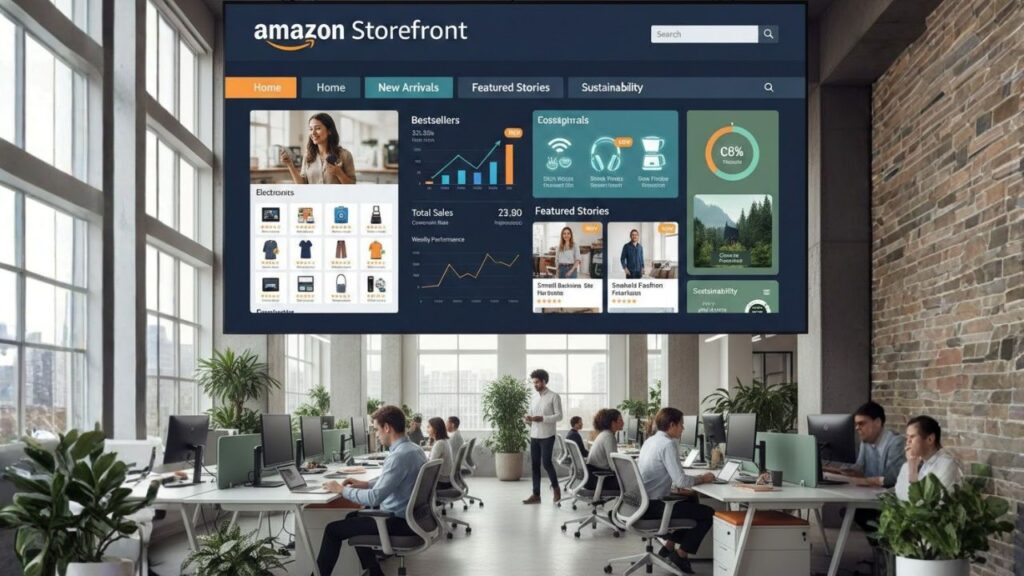
Add up to 5 pages (Home, Bestsellers, New Arrivals, Featured Stories, Sustainability). Ensure each collection includes at least three relevant products and no unrelated listings.
Step 5: Preview, Submit & Optimize
Use Amazon’s mobile and desktop preview to check layout and performance. Stores that fail Core Web Vitals (especially CLS and LCP) get returned for changes. Once approved (typically ~58 hours), your Storefront goes live.
How to Create Amazon Storefront That Converts
Launching your Storefront is just the first step. To maximize impact:
Use High‑Quality & Compliant Visuals
All images should be crisp, original, free of overlays, and meet Amazon’s 2026 size guidelines to avoid moderation flags.
Curate Collections by Theme
Create buyer‑centric sections like “Seasonal Essentials,” “Top Rated,” or “Gift Ideas.” This improves engagement and session time — metrics Amazon rewards.
Add Interactive Content
Incorporate Amazon‑supported video, lifestyle photos, and carousel elements to tell your brand story.
Preview on Mobile & Desktop
Amazon shoppers are highly mobile — ensure your page loads quickly and looks great across devices.
Track Key Metrics
CTR from Sponsored Brands placements and “Add to Cart” per session now influence your Store’s algorithmic visibility. Use Amazon Insights to refine layouts, CTAs, and featured content.
Promoting Your Amazon Storefront in 2026
- Link from Sponsored Brands Ads directly to your Store URL for higher conversion rates.
- Share your Store link via social media, email newsletters, and external campaigns.
- Use Amazon Attribution to track off‑Amazon traffic impact.
Streamline Your Amazon Storefront Finances with PlugBooks.io
Managing sales, inventory, fees, and taxes on Amazon can quickly become overwhelming, especially as your Storefront grows. PlugBooks.io simplifies this process by automatically syncing your transactions with QuickBooks, generating ready-for-tax reports, and keeping your financial data accurate and up to date.
This allows sellers to focus on building their brand and boosting sales, while PlugBooks handles the numbers behind the scenes — turning complex accounting into a seamless, stress-free workflow.

People Also Ask (PAA)
Q1: What makes an Amazon Storefront different from a normal listing?
A: A Storefront is a branded hub with multi‑page layouts and storytelling features beyond a single product detail page.
Q2: Can anyone make an Amazon Storefront?
A: Only sellers with a Professional Account and Brand Registry 3.0 approval can create a storefront.
Q3: How long does it take to publish a Storefront?
A: After submission, Amazon’s review process typically takes around 2–5 business days.
Q4: How can I improve storefront traffic?
A: Promote via Sponsored Brands, social shares, and optimize visual storytelling.
Q5: Is a storefront free to build?
A: Yes — creating a storefront is free, but you must maintain a Professional selling plan with associated monthly fees.
Final Thoughts
In 2026, how to make an Amazon Storefront goes beyond setup — it’s about strategic brand building and conversion optimization. With updated eligibility requirements, enhanced visuals, and a data‑driven approach, your Storefront becomes a powerful sales engine inside Amazon’s massive marketplace.
Whether you’re new or experienced, focus on quality content, structured navigation, and continual performance refinement to stay ahead in 2026.
Disclaimer: This blog is for informational purposes and reflects 2026 trends — always check the latest Amazon policies on Seller Central before taking action.