



Amazon seller success in 2025 starts with understanding your account, About Seller profile, and the full breakdown of seller fees. Many new sellers jump in blindly and get confused by complex dashboards, unexpected charges, or account reviews.
This guide simplifies everything step-by-step, helping you build a strong Amazon presence with confidence.
What You Will Learn
- Types of amazon seller account
- What the amazon about seller page shows
- Detailed breakdown of Shop owner fees
- Step-by-step account creation
- Fee-saving strategies
- How PlugBooks.io helps sellers stay profitable
A Short Story to Begin
Ayan, a new seller, put his first goods on Amazon two years ago. It was a simple stainless steel bottle. He assumed selling was easy: list the thing and wait for purchases.
But in 30 days:
- His account went under scrutiny
- Unexpected FBA fees cut into his income.
- His rating on About Seller went down.
- Payments were late because verification was missing.
Ayan was confused until he learnt how the Vendor account worked, how Amazon charges merchants, and how bookkeeping software like PlugBooks made everything easier.
Ayan’s store makes six figures a year now.
What’s the difference?
He didn’t conjecture what the system was; he knew it.
This instruction will let you achieve the same thing.

What Is an Amazon Seller?
Anyone who sells anything on Amazon’s marketplace through Seller Central is a Shop owner. Amazon has capabilities for managing inventory, orders, ads, and payments.
Different kinds of Vendor:
1. Individual Seller
- No monthly fee
- Fee for selling each item
2. Professional Seller
- $39.99 monthly subscription
- No charge per item
- Access to advanced features
Other Categories:
- Vendor (Amazon buys from you)
- Brand-Registered Seller (more protection and A+ content)
Understanding the Amazon Seller Account
Your Vendor account is the control center of your entire business.
1. Requirements
- Active email & phone number
- Government ID
- Bank account
- Credit/debit card
- Business address
2. Individual vs Professional Accounts
| Feature | Individual | Professional |
| Monthly Fee | $0 | $39.99 |
| Per-Item Fee | Yes | No |
| Ads | Limited | Full Access |
| APIs | No | Yes |
| Bulk Upload | No | Yes |
3. Common Errors During Setup
- Mismatched address on ID & bank statement
- Low-resolution ID images
- Incorrect tax information
- Using shared WiFi/VPN during verification
How to Create an Amazon Seller Account
Desktop Method Step-by-Step
- Sign up on Amazon Seller Central
- Enter your email & create password
- Add business details
- Complete identity verification
- Add tax information
- Add bank details
- Submit account for approval
Tips to Avoid Rejection
- Use the same address on all documents
- Upload clear ID images
- Avoid VPNs while registering
Mobile Method Steps
- Install Amazon Seller App
- Create login
- Upload ID & documents
- Complete selfie verification
- Add tax & bank info
Fast Approval Tips
- Capture photos in daylight
- Use original documents (not screenshots
What Is Amazon About Sellers?
The amazon seller page is your public reputation card. Customers check it before buying.
What It Shows
- Business name
- Years active
- Customer service rating
- Order defect rate
- Shipping performance
- Return policy
Improving Your About Seller Profile
- Ship on time
- Maintain accurate listings
- Respond to messages within 24 hours
- Keep products in stock
- Request feedback ethically
Amazon Seller Fees Explained
Understanding Marketplace merchant fees is crucial for profitability.
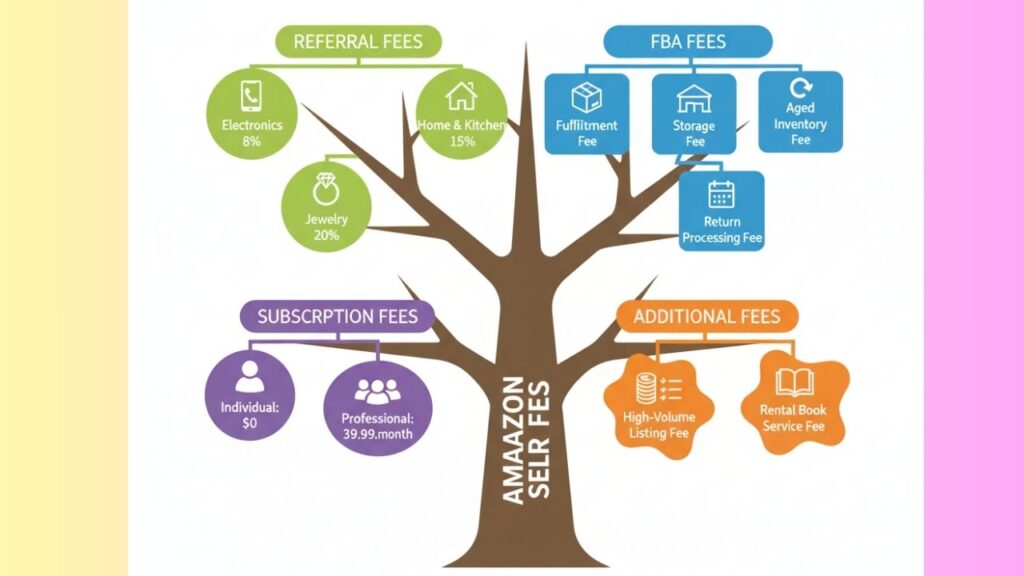
1. Referral Fees
Amazon charges a percentage for every sale (usually 8–15%).
Examples
- Electronics: 8%
- Home & Kitchen: 15%
- Jewelry: 20%
2. FBA Fees
Fulfillment Fee
Covers picking, packing, and shipping.
Storage Fee
Charged monthly based on cubic feet.
Aged Inventory Fee
Applies after 181 days.
Return Processing Fee
Charged for customer returns in certain categories.
3. Subscription Fees
- Individual: No monthly fee
- Professional: $39.99/month
4. Additional Fees
Other Charges
- Refund administration fee
- High-volume listing fee
- Rental book service fee
How to Reduce Amazon Seller Fees
Strategies
- Use optimized packaging for lower FBA charges
- Avoid aged storage fees
- Track fees using PlugBooks.io
- Maintain competitive pricing
How Marketplace Seller Fee Work
Payment Cycle
- Payout every 14 days
- Reserve balance may apply (7–14 days)
Understanding Reports
- Amazon settlement reports
- FBA fee breakdown
- Refunds & reimbursements
Common Problems Marketplace Seller Face
Major Issues
- Account suspension
- Listing suppression
- Payment delays
- Inventory shortages
- Negative reviews
- FBA shipment errors
Solutions
- Submit proper appeals
- Keep inventory updated
- Maintain product quality
- Improve customer communication
Security & Safety Tips
- Enable 2FA
- Avoid logging in from public WiFi
- Never click suspicious emails
Protect Your Brand
- Use Brand Registry
- Monitor unauthorized sellers
- File trademark/IP claims
Protect Inventory
- Track FBA shipments
- Manage aged inventory
- Keep SKUs organized
How PlugBooks.io Helps Online Seller
Managing Amazon seller fees and accounting manually is nearly impossible. PlugBooks.io makes it effortless.
What PlugBooks.io Offers
- Automated bookkeeping
- FBA fee & referral fee tracking
- Settlement report breakdown
- Profit & loss dashboard
- Integration with QuickBooks & Xero
- Tax-ready financial statements

FAQs
1. What is an account for selling on Amazon?
It is the place to keep track of orders, inventory, payments, and ads.
2. What does the seller page show?
Your rating, customer service analytics, business details, and delivery performance.
3. What are the fees?
Fees for referrals, FBA, storage, subscriptions, and more.
4. Why is my account under review?
Document mismatch, suspect login, or incomplete banking info.
5. How do I lower fees?
Better packing, fast turnover, and leveraging PlugBooks.io for fee monitoring.
6. How often do merchants on Amazon get paid?
Every 14 days, barring reserve periods.
Quick Summary:
- It’s important to know the basics of selling on Amazon.
- Set up your seller account the right way
- Make your About Seller profile better
- Learn all Online seller fees
- Avoid common mistakes
- For clear finances, use PlugBooks.io
Conclusion
Being an Amazon seller is a profitable prospect in 2025 — but only if you understand your seller account, maintain a solid Amazon About Seller profile, and control your fees. With the right tools and clear knowledge, you can develop a solid, scalable Amazon business without any financial problems.