



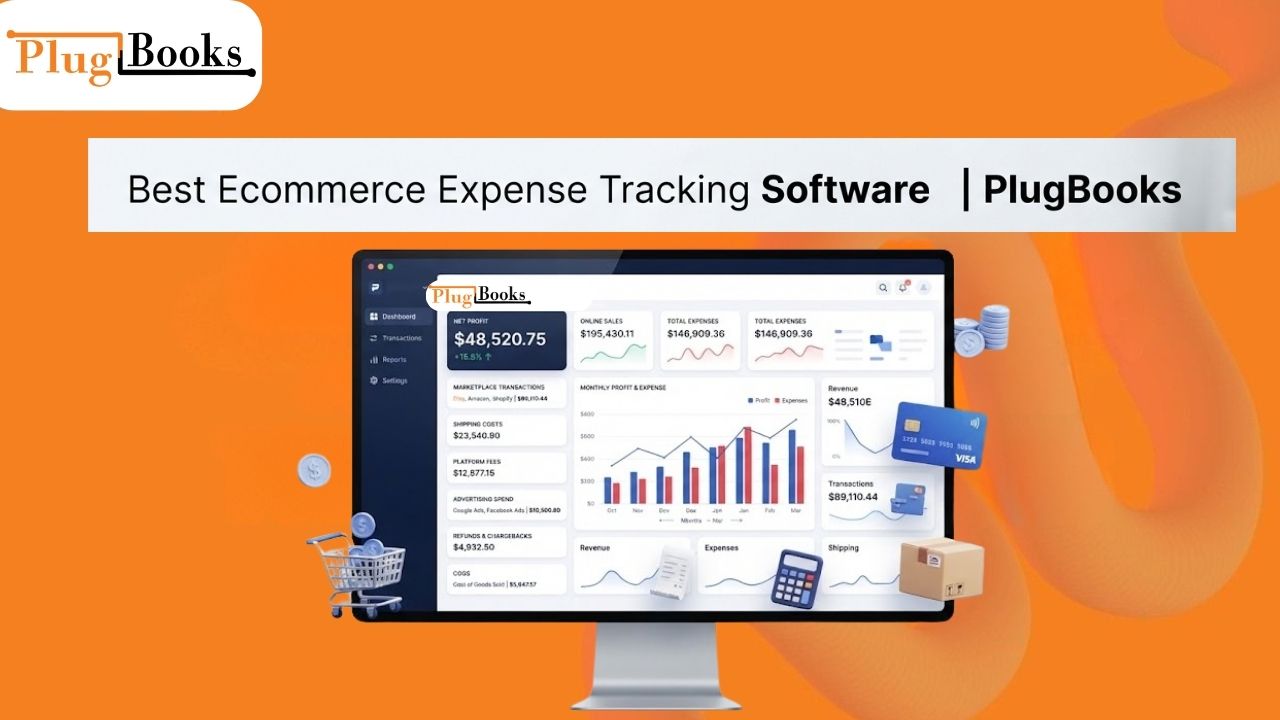
Ecommerce expense tracking is essential for online sellers who want to understand where their money is going and how expenses affect overall profitability. Running an ecommerce business means managing much more than orders and sales. Marketplace fees, payment charges, refunds, shipping, advertising, inventory costs, and other expenses can quickly affect your margins.
When revenue and expenses are properly organized, sellers can identify their major costs, understand their actual profitability, and maintain cleaner financial records.
PlugBooks helps ecommerce sellers organize sales, expenses, fees, refunds, COGS, settlements, payouts, and profit in one place. It also connects with QuickBooks and Xero, making it easier to incorporate ecommerce data into an existing bookkeeping workflow.
What Is Ecommerce Expense Tracking?
Ecommerce expense tracking is the process of capturing, arranging, categorising and evaluating the costs of running an online store.
Common ecommerce costs are:
- Marketplace and transaction fees
- Handling charges
- Shipping & delivery
- Advertising & Marketing Expenses
- Returns & refunds
- Cost of Sales (CoS) Taxation
- Storage costs
- Software and running costs
- Other operational costs
Tracking these costs alongside sales gives sellers a clearer picture of their financial performance.
For example, a monthly sales number of $20,000 doesn’t guarantee the vendor made $20,000 in profit. You have to account for marketplace fees, COGS, advertising, refunds, shipping and other operating expenses.
Why Is Expense Tracking Important for Ecommerce Sellers?
You can’t determine whether your ecommerce firm is profitable by looking at sales data alone.
A seller may have growing revenues, while the expenses are growing faster. If your finances are not organised and recorded, it might be hard to know where you are losing margin.
Proper budget management helps vendors address queries like:
- How much did my business spend this month?
- How much did marketplace fees cost?
- What did I spend on advertising?
- How much did refunds reduce my revenue?
- What are my COGS?
- How much was actually paid out to my bank?
- What is my profit after business expenses?
Tracking these numbers periodically will allow sellers to look back at their financial performance with far more clarity.
What Ecommerce Expenses Should You Track?
While every online business has different costs, there are a number of expense areas that ecommerce enterprises have in common.
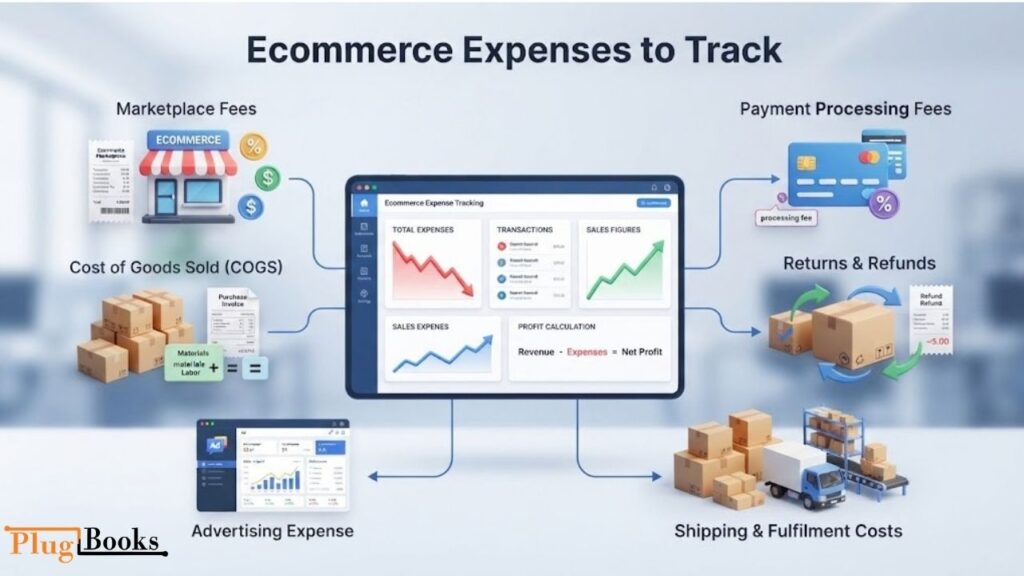
Market Place Fees
Marketplaces may impose a variety of fees on transactions and settlements. Such costs can include, for example, selling fees, transaction fees, commissions and other costs of the marketplace.
Separating these expenses from sales revenue gives merchants a clearer view of the true cost of selling through each channel.
Fees for Payment Processing
The payment processors may impose a fee for processing transactions. The fees might be taken off before the money goes to the seller.
Sellers can reconcile their gross sales to what they really get by tracking payment charges.
Returns and Refunds
Refunds immediately affect revenue and perhaps additional costs.
Seeing refunds and returns in the financials stops sellers from just looking at gross sales and assuming that is their actual revenue.
Shipping & Fulfilment Costs
Shipping, packaging, fulfilment, storage and related logistics can have a big impact on ecommerce margins.
The expenditures should be factored into the overall profitability analysis of items and sales channels.
Advertising Expense
Paid advertising can be useful to generate sales. But the advertising costs eat into the amount remaining after generating revenue.
Tracking ad spend via sales makes it easy to see the impact of marketing spend on overall business profitability.
Costs of Goods Sold
Cost of Goods Sold (COGS) The cost of goods sold of a business is the direct cost of the commodities sold.
This is especially true for internet retailers where income without product expenses doesn’t tell the whole story of profitability.
Tracking Ecommerce Costs vs. Sales
Sales tracking shows you how much revenue your shop made. Expense monitoring tells you how much it cost you to make that money.
Consider the following simple example:
- $25,000 in sales.
- COGS: $10k
- Marketplace fees $3,000
- Advertising $2,000
- Shipping and other costs $3,000
The store did $25,000 in sales, but the amount left over after these charges is a lot less.
So ecommerce financial management needs to go beyond revenue. Sellers should look at sales, fees, refunds, COGS, operational expenditures, settlements and payouts as a whole.
Why Manual Ecommerce Cost Tracking Can Become Difficult
When an ecommerce firm is small, spreadsheets can help. But when the quantity of orders increases, it becomes more and more difficult to process financial information manually.
A vendor may have to:
- Download reports from different platforms
- Review every transaction
- Classification of costs
- Marketplace fees management
- Refund of records
- COGS Revisions
- Reconciliation settlement
- Compare incentives vs bank deposits
- Monthly preparation of bookkeeping records
All of this done by hand increases the risk of missed transactions, duplicate entries, mis-categorization and outdated information.
This is where ecommerce expense tracking software can help create a more structured workflow.
What Should You Look for in Ecommerce Expense Management Software?
Spreadsheets are helpful for small ecommerce enterprises. But when the order volume is growing, it is becoming more and more difficult to manage the financial information manually.
A vendor may need to:
- download reports from several platforms
- Review All Transactions
- CLASSIFICATION OF EXPENSES
- Marketplace Fee Tracking
- Refunds on file
- Update on COGS
- Settled settlements
- Compare bank deposit bonuses
- Monthly preparation of book keeping records
This human effort increases the chances of missed transactions, duplicate entries, incorrect classification and outdated information.
This is where eCommerce expense tracking software can assist with a more organised approach.
How PlugBooks Can Help You Control Your Ecommerce Costs
PlugBooks is designed for ecommerce sellers who need to organize their financial data without managing multiple disconnected reports.
The platform helps merchants track key ecommerce information including transaction, orders, refunds, fees, commissions, taxes, settlements, disbursement, expenses, payouts, COGS and profit.
Rather than needing to view sales in one report, fees in another and payouts somewhere else, sellers can put those financial facts into a more organised process.

Track Ecommerce Sales and Transactions
Ecommerce bookkeeping is driven by sales data and transaction data.
Sellers use PlugBooks to keep transaction information structured so they can view sales activity and tie that to the related fees, refunds, expenses, and settlements.
That gives sellers more context than just looking at revenue.
Keep Marketplace Fees and Expenses Organized
Marketplace fees can take a bite out of the margins of an ecommerce business.
PlugBooks helps merchants track their sales information, fees and other transaction charges so they may get a better understanding of what they are actually keeping from their sales.
This can be especially valuable in assessing the performance of the many sales channels.
Returns & Refund Management
Refunds are a major component of ecommerce financial reporting.
PlugBooks displays refund data within sellers’ financial data for simpler analysis of the impact of returned orders on revenue and profitability.
Control COGS for More Accurate Profit Monitoring
Knowing your sales includes knowing your profit.
PlugBooks now has COGS tracking! Sellers could monitor their product costs and see how well they were doing financially.
When sellers analyse COGS in conjunction with sales, fees, refunds and operating expenses, they get a more complete view of their online profitability.
Understand Payouts and Settlements
Gross sales for a vendor and the payment made by a marketplace to a seller may not be the same due to fees, refunds, adjustments and other deductions.
These numbers are linked with settlement and payout tracking.
Instead of asking why the bank deposit is less than the sales, sellers can see the financial activity that led to the final payout.
Sync PlugBooks With QuickBooks or Xero
PlugBooks can sync with QuickBooks and Xero, making it a good choice for sellers who already have a solid bookkeeping system in place.
This connection may help to incorporate ecommerce sales and financial information into the seller’s wider bookkeeping workflow.
This also means sellers don’t necessarily have to ditch the accounting software they’re already using to boost their ecommerce financial tracking.
Manage Ecommerce Financial Data Across Sales Channels
Many ecommerce companies sell on multiple channels.
For example, a vendor might have an Amazon store and sell on eBay or Shopify as well.
Each platform can have its own transaction structure, transaction fees, refunds, settlement schedule, and reporting format. All of this is done manually which might make reconciliation more time intensive.
PlugBooks lets sellers organise their ecommerce financial information so they can evaluate sales, expenses, payments and profitability inside a more centralised process.
Turn Expense Data Into Profit Insights
One of the most important reasons to track spending is to know profitability.
A simple way to calculate ecommerce profit is:
Sales Revenue – COGS – Fees – Refunds – Operating Expenses = Profit
The precise calculation may vary from business to business and according to bookkeeping methods, but the idea is simple: Revenue is not Profit.
Organising sales, COGS, fees, refunds, expenses, and payouts can make a seller’s financial reporting more useful.
PlugBooks Dashboard and Ecommerce Insights
A long transaction list does not always make it easy to understand how a business is performing.
A dashboard can provide a broader view of important financial information, helping sellers review trends in sales, expenses, settlements, and profitability.
PlugBooks provides dashboard and financial insight features designed to give ecommerce sellers a more convenient way to review their business data.
PlugBooks Pricing for Ecommerce Sellers
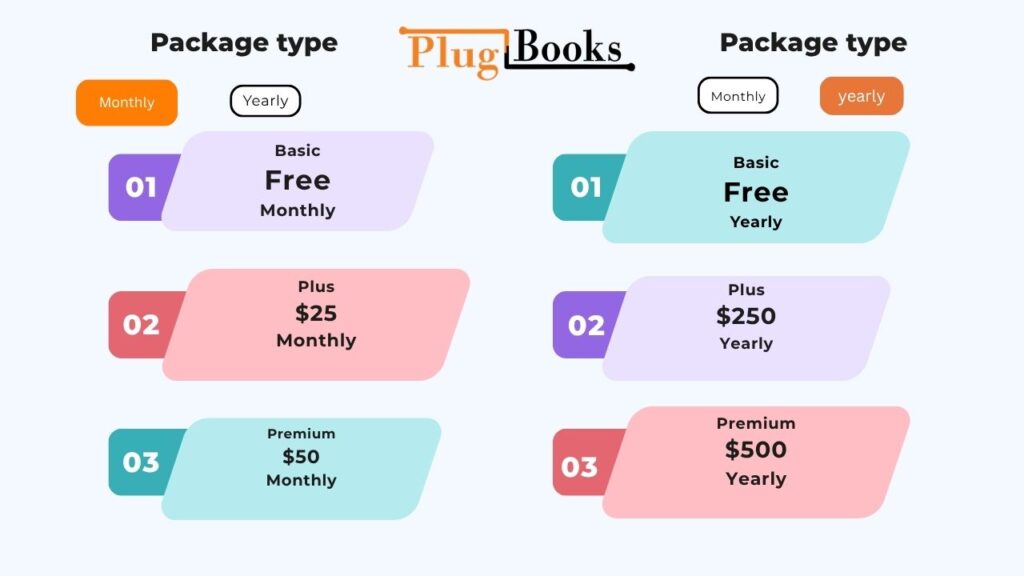
PlugBooks offers Basic, Plus, and Premium packages. Pricing is based on the seller’s selected sales channel order range, which can be adjusted from the pricing page.
Monthly Plans
| Plan | Monthly Price | Current Offer |
| Basic | Free | — |
| Plus | $25/month | 3 Months Free |
| Premium | $50/month | 3 Months Free |
The monthly option currently includes 3 months free with the monthly plan as a limited-time offer.
Yearly Plans
| Plan | Current Yearly Price | Previous Price | Current Offer |
| Basic | Free | — | — |
| Plus | $250/year | $300/year | 6 Months Free |
| Premium | $500/year | $600/year | 6 Months Free |
The yearly option currently includes 6 months free with the yearly plan as a limited-time offer.
Select Your Ecommerce Order Range
With PlugBooks, sellers may also specify the range of orders for their sales channel before choosing a package.
The price screen shows ranges of orders, such as:
500 → 1K → 5K → 10K → 15K → 20K → 25K → MAX
This allows sellers to choose prices based on how much ecommerce they do.
Sellers should check the current pricing page on PlugBooks prior to subscribing as order ranges, pricing and promotional offers are subject to change.
Who Can Use Ecommerce Expense Tracking Software?
Ecommerce spending management software can help:
- Amazon Sellers
- eBay vendors
- Shopify merchant
- Multi-channel eCommerce companies
- E-commerce stores on the rise
- QuickBooks users who are selling
- Xero sellers
- Bookkeeping for enterprises (external bookkeepers)
This can be especially useful if your transaction volumes increase and you find yourself spending too much time trying to keep track of multiple spreadsheets manually.
PlugBooks: Starting to Track Ecommerce Expenses
PlugBooks is easy to get started with:
1. Get Your PlugBooks Account Ready
The first step is to set up your ecommerce bookkeeping account.
2. Connect Your Sales Channel
Connect your online sales channels and bring the key transactional data into your workflow.
3. Generate Revenue and Expenses
Check your sales, fees, refunds, settlements, payouts, COGS and other expenses.
4. Connect QuickBooks or Xero
If you already use QuickBooks or Xero for bookkeeping, connect the bookkeeping platform to include your ecommerce financial data into your existing process.
5. Review profitability and reports
Dashboards & analytics to analyse your ecommerce income, spending, settlements & profit.
This provides a more uniform method of ecommerce bookkeeping and expense control.

Why Accurate Ecommerce Expense Records Matter
Accurate financial records let sellers know what’s really going on inside their firms.
Missing or misclassified expenses might distort profit calculations. Organised records, in contrast, make it easy to identify main costs, reconcile payouts, assess margins, and generate bookkeeping information.
So the goal of expenditure tracking is not only to generate yet another list of costs. It is to link such expenditures to sales and business performance.
Final Thoughts
Ecommerce expense tracking is an important part of understanding the financial health of an online business.
Sales, marketplace fees, refunds, COGS, advertising, shipping, payouts, and other expenses all contribute to the final financial result. Tracking these elements separately can make bookkeeping difficult, particularly when a seller operates across multiple sales channels.
PlugBooks brings important ecommerce financial information into one organized workflow, including sales, transactions, fees, refunds, expenses, COGS, settlements, payouts, and profit. It can also connect with QuickBooks and Xero for sellers who want to integrate ecommerce data with their existing bookkeeping process.
With 3 months free on the monthly plan and 6 months free on the yearly plan, sellers can explore the available packages and choose an option based on their sales channel order range.
Ready to simplify your ecommerce expense tracking? Start your PlugBooks account and bring your sales and expenses into a more organized workflow.
Frequently Asked Questions
What is ecommerce expense tracking software?
Ecommerce expense monitoring software provides online sellers with a way to record, organise, categorise and review business costs, such as marketplace fees, refunds, shipping, advertising, COGS and operating expenses.
What should an online merchant track costs for?
Ecommerce merchants typically manage marketplace fees, payment processing fees, shipping and fulfillment costs, advertising, refunds, returns, COGS, taxes, software costs and other expenses of running their online business.
Why is tracking expenses vital for an online store?
Expense tracking allows merchants to compare expenditures to sales income and determine their true profitability. It can also help to make reconciliation, bookkeeping and financial reporting more organised.
Does ecommerce software track COGS?
Yes. Ecommerce bookkeeping software may assist sellers categorise COGS, and tie product costs back to sales data, providing sellers a better picture of profitability.
Can PlugBooks link to QuickBooks and Xero?
Yes. PlugBooks integrates with QuickBooks and Xero, so sellers may import ecommerce financial data into their current bookkeeping process.
Does PlugBooks track ecommerce costs and refunds?
Yes. PlugBooks helps organise transaction related information such as fees, refunds, settlements, payouts and sales so merchants can view these items together.
What is the price of PlugBooks?
Get started on a Free Basic plan with PlugBooks. The monthly option for the Plus plan is $25/month and the Premium plan is $50/month. Current yearly fee is $250/yr for Plus and $500/yr for Premium.
How many free months does PlugBooks have?
PlugBooks is having a limited time deal: get 3 months free on the monthly plan or 6 months free on the yearly plan. The relevant package also depends on the range of sales channel orders specified .