



Merch by Amazon is one of the most accessible ways for designers, freelancers, and entrepreneurs to start selling custom apparel online. With zero inventory to manage and Amazon handling printing and shipping, anyone can turn creative designs into a revenue stream.
Whether you want to sell t-shirts, hoodies, or sweatshirts, Amazon’s print-on-demand platform lets you reach millions of customers worldwide. In this guide, we’ll cover everything you need to know in 2026, from creating your first design to understanding royalties and growing your apparel business.
Key Takeaways:
- What Amazon POD is and why it’s popular
- How to open a Merch by Amazon account
- Steps to upload and sell your designs
- Tips for optimizing sales and earnings
- How PlugBooks helps track your income and taxes
What is Merch by Amazon?
At its core, Amazon’s print-on-demand service is a platform for custom merchandise. This means you don’t have to handle inventory, shipping, or customer service. You create a design, upload it, and Amazon handles the rest. The system automatically prints your design on the selected product when someone makes a purchase.
This platform is perfect for:
- Freelance graphic designers looking to monetize their skills
- Small business owners who want an additional revenue stream
- Anyone seeking passive income from online sales
Unlike traditional e-commerce, you don’t risk upfront costs or unsold inventory. You get paid via royalties whenever your products sell.
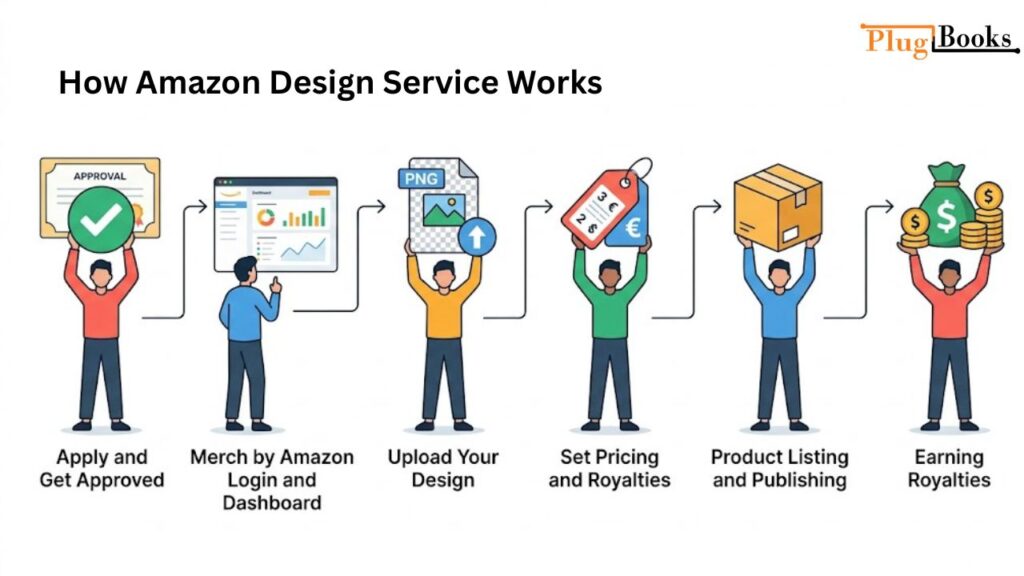
How Amazon Design Service Works
The process is simple, but understanding each step is key to success:
Step 1: Apply and Get Approved
Before you start, you need to create an account. Search “how to open a Merch by Amazon” to find the official application process. You’ll provide basic details, and Amazon reviews your application. Approval may take a few days to weeks depending on demand.
Pro Tip: Focus on your portfolio, previous design experience, or niche expertise to improve your chances of approval.
Step 2: Merch by Amazon Login and Dashboard
Once approved, you can access the Amazon custom merch login page. This is your central hub for managing designs, tracking sales, and analyzing performance. Here’s what you can do on the dashboard:
- Upload new designs
- Set product types and colors
- Price your items and calculate royalties
- Track orders and sales analytics
Amazon provides a clean, easy-to-use interface so even beginners can navigate it effortlessly.
Step 3: Upload Your Design
After logging in, click “Create Product” and upload your design in the recommended format (PNG, 300 dpi, transparent background). You’ll then select the type of apparel, colors, and sizes.
Step 4: Set Pricing and Royalties
Pricing is key. Your royalty is the difference between your selling price and Amazon’s base cost. For example:
- Selling Price: $25
- Amazon Cost: $13
- Your Royalty: $12
Setting the right price ensures competitiveness while maximizing earnings.
Step 5: Product Listing and Publishing
Once your design and price are set, Amazon publishes your listing. Customers can now purchase your product, and Amazon handles printing, packaging, and shipping.
Step 6: Earning Royalties
Every time your product sells, Amazon pays you royalties monthly. You can track earnings in your dashboard and export reports for accounting purposes.
Why Sellers Prefer Amazon’s Design Service
Several factors make Merch by Amazon a favorite among creators:
- Zero Inventory Hassle: You don’t store or ship products.
- Global Reach: Your products are visible to millions of Amazon customers.
- Passive Income Potential: Once uploaded, designs can sell indefinitely.
- Easy Analytics: Amazon provides clear sales data to optimize designs.
If you want to make serious income, focus on creating unique, trendy, and high-quality designs. Use tools like Google Trends or Amazon search suggestions to identify popular niches.
How to Set Up an Amazon POD Account
Many beginners ask, “How to Set Up an Amazon POD Account?” Here’s the step-by-step process:
- Visit the official Merch by Amazon website.
- Click “Sign Up” and log in using your existing Amazon account or create a new one.
- Fill in personal details, tax information, and business type.
- Submit your application and wait for approval.
- Once approved, use the Merch by Amazon login to access your dashboard and start uploading designs.
Tip: Ensure you comply with Amazon’s content guidelines to avoid design rejections.
Amazon by Merch: Tips for Maximizing Earnings
The term “amazon by merch” refers to the way Amazon manages your designs and sales behind the scenes. To make the most of it:
- Research Your Niche: Look for underserved categories or trending designs.
- Optimize Titles and Descriptions: Use relevant keywords to appear in Amazon search.
- Upload Consistently: More designs mean more chances of sales.
- Promote Your Products: Share links on social media, blogs, and email lists.
- Monitor Analytics: Track which designs sell best and replicate success.

Earning Opportunities on Amazon POD
Earnings vary based on price, product type, and sales volume. Here’s an example:
| Product Type | Selling Price | Amazon Cost | Royalty |
| T-Shirt | $25 | $13 | $12 |
| Hoodie | $45 | $28 | $17 |
With multiple designs, royalties can quickly add up. Top sellers often earn thousands of dollars monthly, especially in trending niches.
Common Challenges and How to Solve Them
- Design Rejections: Follow Amazon’s guidelines closely. Avoid copyrighted content.
- Low Sales: Refine keywords, improve designs, and analyze competitors.
- Limited Slots: Merch by Amazon increases tier levels gradually as you prove sales potential.
- Taxes and Accounting: Use PlugBooks to automate reports and simplify bookkeeping.
How PlugBooks Helps Merch Sellers
For creators selling through Amazon’s print-on-demand platform, tracking earnings, royalties, and tax responsibilities can be overwhelming. PlugBooks makes it simple by:
- Automatically syncing with your Amazon account
- Generating monthly and yearly royalty reports
- Exporting data to QuickBooks or Xero for easy accounting
- Helping track profits and expenses for tax purposes
This ensures you focus more on designing and selling, while PlugBooks handles financial organization.

FAQs
1. How do I get approved for Amazon’s print-on-demand service?
Apply on the official site and make sure your portfolio or previous design work shows your creative skills.
2. What’s the difference between Amazon POD and amazon by merch?
“Amazon by Merch” usually refers to Amazon’s backend system that manages designs, printing, and order fulfillment. Amazon POD is the platform you use as a creator to upload and sell your products.
3. How do I log in to Amazon custom merch?
Go to the official dashboard, enter your Amazon account credentials, and access your design uploads and sales tracking tools.
4. How do I set up an account on Amazon’s print-on-demand platform?
Follow the step-by-step sign-up process. Approval usually takes a few days.
5. Do I need to manage shipping myself?
No. Amazon prints and ships your designs directly to customers, so you don’t have to handle fulfillment.
6. Can I sell internationally using Amazon custom merch?
Yes, your products can appear on multiple Amazon marketplaces depending on your account settings.
Quick Recap
- Amazon POD lets anyone sell custom apparel without inventory.
- The Amazon dashboard (login) manages designs and tracks sales.
- Amazon by Merch handles printing and fulfillment automatically.
- Focus on niches, original designs, and keywords to boost earnings.
- PlugBooks simplifies tracking income, royalties, and taxes.
Conclusion
Amazon’s print-on-demand platform is an excellent way for anyone to monetize their creativity and earn passive income. By following proven strategies, exploring trending niches, and consistently uploading high-quality designs, you can turn your artwork into a profitable venture.
Whether you’re a freelancer, designer, or small business owner, knowing how to set up an Amazon POD account and using tools like PlugBooks can help make 2026 your most successful year yet.
