



Shopify upsell app alternatives help merchants compare tools for recommending complementary products, offering quantity discounts, creating bundles, and presenting additional offers after a purchase. The right choice depends on where you want to show offers, how your products are sold, and how much you can spend.
This guide compares Shopify upsell apps using available app listings, explains the differences between upselling and cross-selling, and provides a practical framework for selecting and measuring an app. App features and prices can change, so the linked listings are the source of truth before installation.
1. Kaching Bundles & Upsells
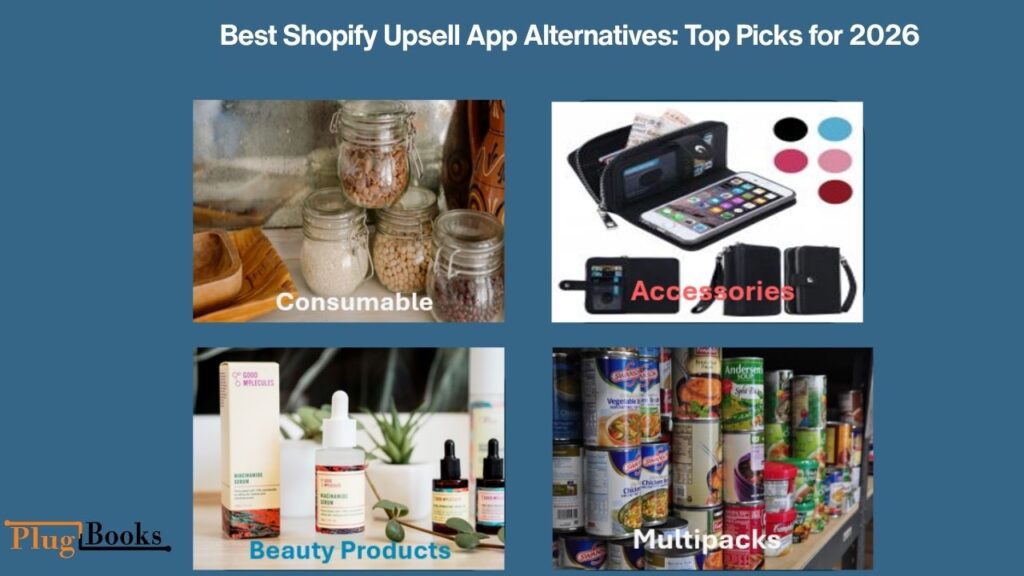
Kaching Bundles & Upsells is designed for merchants who want to offer product bundles and quantity-based discounts. It can help stores present multiple purchase options, allowing customers to choose a quantity or bundle that suits their needs.
Best for: Stores selling consumables, accessories, beauty products, and items customers may purchase in multiples.
Features listed by the app:
- Product bundles and quantity breaks
- Multiple layouts and customization
- Bundle offers intended to increase average order value
- Live chat support on listed paid plans
Pricing: The Shopify App Store currently lists paid plans starting at $14.99 per month, with higher tiers at $29.99 and $59.99. A seven-day trial is listed for paid plans, while free installation applies to development stores. <Cite refs={[“turn444996search0″,”turn444996search1”]}/>
Consideration: Check the revenue limits associated with each plan before choosing it.
2. Essential Upsell & Cross Sell
Essential Upsell & Cross Sell offers product-page and post-purchase offers, with additional cart offers available on higher plans. Its listing also includes analytics to help merchants evaluate offer performance.
Best for: Merchants who want to test product recommendations and post-purchase offers.
Features listed by the app:
- Product-page offers
- Post-purchase offers
- Cart-page offers on eligible plans
- Offer analytics and translations
Pricing: The listing shows a free plan with up to $100 in additional revenue generated, a $9.99 monthly plan with up to $500, a $19.99 plan with up to $1,000, and a $39.99 plan with unlimited additional revenue under the listed plan terms. <Cite refs={[“turn516740search1″,”turn516740search8”]}/>
Consideration: Pricing is linked to additional revenue limits, so estimate the potential cost as your store grows.
3. Simple Bundles & Kits
Simple Bundles & Kits focuses on creating product bundles, kits, multipacks, and mix-and-match offers. Its listing also describes inventory synchronization and fulfillment support for different bundle structures.
Best for: Stores that sell kits, multipacks, and combinations of individual products.
Features listed by the app:
- Build-your-own-bundle options
- Mix-and-match bundles
- Buy-one-get-one offers and volume discounts
- Inventory synchronization for supported configurations
Pricing: The Shopify App Store identifies a free plan as available. Check the current listing for the exact limits and paid-plan costs. <Cite refs={[“turn444996search10″,”turn444996search12”]}/>
Consideration: Confirm that the app supports your inventory setup, especially when bundle components are also sold separately.
4. Kaching CartDrawer Cart Upsell
Kaching CartDrawer focuses on the cart experience. It lets merchants present additional products and promotional incentives while customers review their selections.
Best for: Stores that want cart-based recommendations and free-shipping progress indicators.
Features listed by the app:
- Slide-out cart with upsell recommendations
- Free-shipping and free-gift bars
- Trust badges and payment icons
- Customization options
Pricing: Listed paid plans start at $9.99 per month, with additional tiers at $14.99 and $24.99. The listing specifies order limits for the paid tiers and a 14-day trial. Free access is available for development stores. <Cite refs={[“turn516740search2″,”turn516740search9”]}/>
Consideration: Test the cart on mobile devices and ensure that the additional offers do not obstruct the checkout button.
5. Upsell.com – ReConvert Upsell
Upsell.com, formerly known as ReConvert, offers upselling and cross-selling opportunities across different stages of the customer journey. Its listing describes product recommendations, cart offers, post-purchase funnels, and one-click upsells.
Best for: Merchants who want to combine pre-purchase and post-purchase offers.
Features listed by the app:
- Product recommendations and related products
- Frequently bought together offers
- Cart and post-purchase upsells
- One-click post-purchase funnels
- Checkout upsell functionality for Shopify Plus stores
Pricing: A free plan and free trial are listed, but the exact cost depends on the current pricing terms. Review the app’s billing model and plan conditions before installation. <Cite refs={[“turn516740search17″,”turn516740search18”]}/>
Consideration: Confirm which features are included in your plan and whether checkout-related functionality requires Shopify Plus.
Explore Upsell.com – ReConvert Upsell.
6. Dealeasy: Volume Discounts App
Dealeasy is a relevant option for merchants who want quantity discounts, tiered pricing, and bundle-based promotions. Instead of relying only on product recommendations, stores can give shoppers a financial incentive to purchase more units.
Best for: Stores selling products that customers frequently purchase in larger quantities.
Features listed by the app:
- Quantity discounts and tiered pricing
- Multiple discount and bundle formats
- Styling customization
- Support for eligible plan users
Pricing: The current listing shows a free-to-install tier for up to 50 orders per month, followed by paid tiers listed at $9 per month for up to 500 orders, $19 for up to 1,000 orders, and $29 for higher order volumes. Charges and order-count conditions should be checked on the official listing. <Cite refs={[“turn444996search2”]}/>
Consideration: Calculate the effect of the discount on your profit margin before encouraging larger orders.
Explore Dealeasy on the Shopify App Store.
Shopify Upsell Apps Comparison
Choosing between different Shopify upsell app alternatives depends on your store’s needs, product catalog, and sales goals. Some apps focus on product bundles and quantity discounts, while others offer post-purchase offers, cart upsells, or cross-sells. Compare each app’s features, pricing, and compatibility with your current Shopify setup before making a decision.
| App | Best use case | Pricing information |
| Kaching Bundles & Upsells | Bundles and quantity breaks | Paid plans from $14.99/month |
| Essential Upsell & Cross Sell | Product and post-purchase offers | Free plan; paid plans from $9.99/month |
| Simple Bundles & Kits | Kits, multipacks, and mix-and-match bundles | Free plan available |
| Kaching CartDrawer Cart Upsell | Cart offers and shipping incentives | Paid plans from $9.99/month |
| Upsell.com – ReConvert | Multiple offer placements and post-purchase funnels | Free plan available |
| Dealeasy | Quantity discounts and tiered pricing | Free-to-install tier; paid tiers listed |
Prices are in USD and reflect the available listings checked for this guide. They are not guaranteed quotes; plan limits, trials, and billing terms can change. Check the official listing linked in each section before making a purchase.
What Is the Best Upsell App for Shopify?
The best upsell app for Shopify depends on your products, store size, budget, and preferred offer placement. An app that works well for a bundle-focused store may not be the right fit for a merchant who wants post-purchase offers.
Use these recommendations as a starting point:
- Product Bundles and Quantity Breaks: Kaching Bundles & Upsells
- Product-Page and Post-Purchase Offers: Essential Upsell & Cross Sell
- Inventory-Aware Product Kits: Simple Bundles & Kits
- Cart-Based Recommendations: Kaching CartDrawer Cart Upsell
- Multiple Upsell Placements: Upsell.com – ReConvert
There is no universal winner for every Shopify store. Compare the current features, pricing, compatibility, and offer placements against your actual requirements before choosing.
Best Upsell App for Low AOV Products
The best upsell app for low AOV products should help shoppers add a useful, affordable item without making the original purchase feel unnecessarily expensive.
For stores selling low-average-order-value (AOV) products, the right Shopify upsell app alternatives can encourage customers to add complementary products, purchase bundles, or choose a larger quantity. For example, a store selling low-cost accessories could offer a relevant add-on at checkout. Keep the offer affordable and useful so customers see value without feeling pressured to spend more.
For example, a phone-case store could recommend a screen protector. A stationery store might suggest a matching pen, while a coffee shop could offer a discounted multipack.
When comparing apps, prioritize:
Low-cost add-ons: Recommend products that naturally complement the main item.
Quantity breaks: Give customers a clear reason to purchase more than one unit.
Simple bundles: Combine related products in a way that makes shopping easier.
Cart offers: Present a relevant item while customers review their selections.
Free-shipping incentives: Set a threshold that encourages a larger basket without making fulfillment unprofitable.
Start with one offer and measure the results. A higher average order value is useful only when the additional revenue justifies the product costs, discount, shipping, and app fees.
Upselling vs. Cross-Selling: What’s the Difference?
Upselling encourages a customer to purchase a higher-value version of the product they are considering. For example, a shopper might choose a premium coffee machine instead of a basic model.
Cross-selling recommends an additional product that complements the original purchase. A customer buying a coffee machine might be offered reusable filters or a cleaning kit.
Bundles and quantity discounts provide another approach by encouraging customers to purchase related items or additional units together.
Choose the method that fits your catalog. Use upselling when the upgrade offers meaningful benefits and cross-selling when an additional product makes the original purchase more useful.
How to Choose a Shopify Upsell App
Before installing an app, evaluate these six factors.
1. Identify Your Main Objective
Decide whether you want to sell more units, recommend complementary products, promote bundles, or create post-purchase offers. A clear objective helps you avoid paying for features you will not use.
2. Check the Full Cost
Compare the subscription fee, revenue limits, order limits, trial terms, and any additional charges. Estimate the total cost at your expected sales volume rather than relying only on the starting price.
3. Verify Compatibility
Check the app’s compatibility with your theme, product variants, inventory setup, and other installed apps. If you need checkout or post-purchase functionality, confirm that it is supported by your Shopify configuration.
4. Test the Customer Experience
Review the offer on mobile and desktop. Make sure recommendations are relevant, prices are clear, and important checkout controls remain easy to access.
5. Review Reporting Features
Look for reporting that shows offer views, acceptance rates, and associated sales. Where possible, use controlled tests to assess whether an offer actually improves results.
6. Start Small
Launch one offer first. Review its impact on sales and profitability before adding more promotions across your storefront.
When comparing Shopify upsell app alternatives, prioritize easy setup, relevant offer placements, reliable tracking, and pricing that fits your store’s order volume.
How to Measure Upsell Performance and Profitability
An increase in average order value does not automatically mean an increase in profit. Merchants should monitor several metrics to understand whether an offer is genuinely helping the business.
| Metric | Why it matters |
| Average order value (AOV) | Measures average revenue per order |
| Offer conversion rate | Shows how often customers accept an offer |
| Store conversion rate | Tracks the percentage of visitors who purchase |
| Gross margin | Shows revenue remaining after cost of goods sold |
| Refunds and returns | Reveal reversals that reduce sales value |
| App subscription cost | Helps calculate the expense of using the tool |
| Fulfillment costs | Account for extra handling and shipping |
For example, a bundle discount may increase AOV but reduce the margin on every unit. If the extra products also require separate shipping, the additional costs could offset the benefit.
Compare results before and after launching an offer. Where practical, use a control group so that changes in normal demand are not mistakenly attributed to the app.

Track Shopify Sales and Expenses With PlugBooks
Upsell apps can help Shopify merchants generate additional sales, but merchants also need organized financial records to understand the effect on profitability.
PlugBooks is an ecommerce bookkeeping solution for sellers who need to organize sales data, refunds, fees, taxes, expenses, and cost of goods sold (COGS). It supports Shopify, Amazon, and eBay and connects with QuickBooks and Xero.
By reviewing bookkeeping records alongside upsell performance reports, merchants can assess whether higher order values are translating into better financial results. Discounts, refunds, payment fees, and fulfillment costs should all be considered when evaluating a promotion.
Explore PlugBooks to learn more about ecommerce bookkeeping and financial tracking for online sellers.
Common Mistakes to Avoid With Shopify Upsell Apps
Avoid these mistakes when introducing upselling to your store:
- Irrelevant recommendations: Products should complement the customer’s original purchase.
- Excessive discounts: Higher order value can still result in lower profit.
- Too many pop-ups: Repeated interruptions can frustrate shoppers.
- Poor mobile layouts: Offers should not obstruct product details or checkout controls.
- Unnecessary app costs: Review whether each paid feature delivers enough value.
- Ignoring fulfillment: Additional products may increase handling and shipping expenses.
- Measuring sales alone: Track conversion rate, margins, refunds, and costs alongside AOV.
Keep offers relevant and simple. Remove promotions that fail to deliver measurable value.
Frequently Asked Questions
What is the best Shopify upsell app for a new store?
A new store should prioritize an affordable plan, straightforward setup, and the specific offer type it needs. Dealeasy has a listed free-to-install tier subject to order limits, while Essential Upsell & Cross Sell offers a free plan with a stated additional-revenue limit. Review the current conditions before installing either app.
Are there free Shopify upsell apps?
Yes. Some apps offer free plans or free-to-install tiers, but these may have limits on order volume, additional revenue, or available features. Check the official listing to understand what is included.
Can Shopify upsell apps increase average order value?
They can increase AOV when customers accept relevant upgrades, bundles, or complementary products. Results depend on customer demand, pricing, product fit, and the shopping experience. Installing an app alone does not guarantee increased sales.
Which upsell strategy works best for inexpensive products?
Affordable complementary items, relevant bundles, and sensible quantity discounts are useful starting points. The offer should feel worthwhile to the customer and remain profitable after product and fulfillment costs.
Should I use cart upsells or post-purchase upsells?
Cart upsells target customers while they review their selections. Post-purchase offers are presented after the initial transaction. Test the available placements and compare conversion performance, customer experience, and fulfillment implications.
Do Shopify upsell apps slow down a store?
An app can affect storefront performance depending on its scripts, integrations, and implementation. Test page speed and mobile usability after installation, and remove unnecessary features or apps.
How do I know whether an upsell app is profitable?
Compare additional revenue with discounts, product costs, fulfillment expenses, refunds, and app fees. Monitor AOV, offer conversion rate, gross margin, and revenue per visitor to make a more informed decision.
Q: How do I choose the right Shopify upsell app alternatives for my store?
Choose Shopify upsell app alternatives based on your budget, product type, average order value, and preferred upsell method. Compare features such as product bundles, cart offers, cross-sells, and post-purchase promotions. Start with a free plan or trial when available, then track conversion rate, average order value, app costs, and profit to determine whether the app is delivering worthwhile results.
What is an upsell ticket on the Ticketmaster app?
In ticketing, an upsell generally means offering a higher-value ticket, seat, or event-related upgrade, depending on the available options. This is different from Shopify upselling, which focuses on additional ecommerce products and purchases.
What is an upsell app on an Android phone?
The phrase can refer to an Android app that promotes premium features, subscriptions, upgrades, or additional purchases. Its meaning depends on the particular app. A Shopify upsell app is a merchant tool for presenting product offers in an online store.
Final Thoughts
The right Shopify upsell app depends on your products, offer strategy, budget, and reporting needs. Compare the available Shopify upsell app alternatives by features, pricing, compatibility, and the placement of their offers rather than choosing based on popularity alone.
Start with one relevant offer, measure its impact on both sales and profitability, and expand only when the results justify the added cost. A focused strategy and reliable financial records can help merchants make better-informed decisions about growing their Shopify businesses.