




eBay Overview acts as the central hub for your account, providing a quick snapshot of your buying and selling activity all in one place. Instead of jumping between multiple pages, this dashboard consolidates your orders, listings, messages, and account performance onto a single screen. Whether you are a buyer tracking purchases or a seller managing your daily business operations, the Overview is designed to keep everything you need organized and accessible in 2026.
What Is eBay Overview?
The ebay overview is the main dashboard where sellers can see a snapshot of their account activities after signing in. It gathers information from many places in your selling account into one workspace instead of showing one feature. This lets you see your business at a glance before drilling down into particular activities.
A typical dashboard will show information like:
- New orders
- Current listings
- Paid Out Pending
- Buyers Messages
- Returns Requested
- Seller performance indicators
- Notifications about your account
Many sellers refer to this dashboard as my eBay selling overview because it brings orders, listings, payments, and account activity together in one place.
The overview is meant to assist vendors prioritise their work. For example, whether you have orders to ship or messages from buyers to reply to, those things are straightforward to see without having to navigate to other menus.
How to Find Your Dashboard
Your dashboard is easy to locate but the navigation can be a little different depending on whether you’re using a desktop browser or the mobile app.
Log in to your eBay account from your desktop computer and access Seller Hub. The first page that usually loads is the Overview tab, which gives you a summary of your selling activities.
You can also check comparable information on the seller dashboard for the mobile app when you’re away from your computer to keep an eye on your orders, communications, and listings.
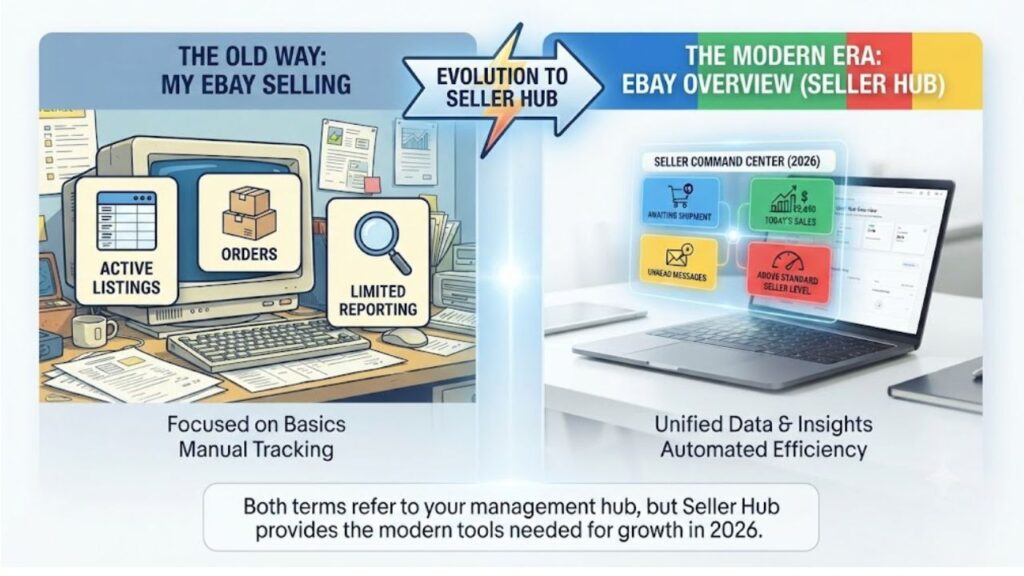
Long term sellers may remember the earlier ebay my selling site. My eBay Selling was the main place to manage listings and orders before Seller Hub became the standard workplace. Today Seller Hub has the same essential functions but in a more organised interface, with more metrics and conveniences.
What Can You See on Your Dashboard?
Although the layout may change slightly as eBay updates its interface, most seller accounts include the same essential sections.
| Dashboard Section | What You Can Do |
| Orders | View new orders, shipments, cancellations, and returns. |
| Listings | Monitor active, scheduled, draft, and ended listings. |
| Payments | Track available funds, payouts, fees, and transaction history. |
| Performance | Review seller standards, traffic, and sales performance. |
| Messages | Respond to buyer questions and order-related conversations. |
| Returns | Manage return requests and refund progress. |
| Notifications | Stay informed about account updates and important alerts. |
If you want to learn how to view selling history on eBay, you can review completed transactions, orders, and payment records through the relevant sections of Seller Hub.
How to Use Your Dashboard to Streamline Daily Sales Routine
One of the main ebay overview advantages is that it aids your daily routine and it does not just show numbers. The more experienced sellers would start their day by looking at this dashboard because it quickly calls out the chores that need attention.
A common regimen might be something like:
- Verify overnight orders to be sent.
- Respond to any new buyer communications.
- Verify if the recent payments have been processed.
- Low stock items – Update inventory
- Review seller performance and account alerts.
- Edit listings requiring a quantity or price modification.
Completing them from one dashboard decreases the possibilities of forgetting an order or losing out on a crucial buyer request. It also benefits sellers by helping them to keep faster handling times, and better customer service, both of which lead to improved seller performance.
This organised approach may really increase productivity for companies handling many orders a day.
eBay Overview VS eBay My Selling
Many sellers still seek for ebay by selling especially if they have been on the market for a number of years. The name is recognisable; the experience has evolved.
My eBay Selling used to be mostly about listing administration and order tracking. As selling features developed, eBay launched Seller Hub to deliver more data, performance insights and payment administration into one workspace.
Today, the Overview page is the beginning point within Seller Hub, giving sellers a snapshot of all that is happening across their account.
| eBay My Selling | eBay Overview |
| Older seller management page | Modern dashboard inside Seller Hub |
| Basic selling information | Complete account summary |
| Focused mainly on listings and orders | Includes payments, performance, messages, and notifications |
| Limited reporting | Quick access to analytics and seller insights |
Both searches are extensively used to refer to the site where sellers monitor and manage their business, however many sellers still use the older terminology.
Overview Understanding eBay Seller Hub —
Seller Hub can be mistaken for the Overview page if you’re new to selling. They are not the same thing.
Note: The eBay Overview Seller Hub page is essentially the homepage inside Seller Hub, rather than a separate selling tool. It provides a summary of your orders, listings, payments, performance, and other account activity.
From the Overview page you can quickly jump to:
- Order
- Listings:
- Marketing.
- Payment
- Performance
- Research
- Shipping
- Seller Support
This setup minimises the amount of clicks required to execute common operations and offers you a clearer view of your business before you start working.
Overview can be a beginning point for sellers, taking them immediately to the portion that needs work, so they don’t have to look at each element separately.
Is Overview eBay Seller Hub UK Different?
Many international sellers look for overview ebay seller hub uk wondering if the dashboard operates differently in the United Kingdom.
The overall design is almost the same. The UK shares the same Seller Hub interface and Overview dashboard as many other areas. Differences are mostly about settings particular to the marketplace, not the dashboard.
For example, UK sellers may see:
- GBP Payouts are displayed in GBP.
- Delivery options from our UK delivery partners.
- Local tax rules, if relevant.
- Specific policies for the marketplace eBay UK.
- Regional advertising tools and sales events.
The dashboard does the same thing no matter what marketplace you are on – it allows sellers to manage their orders, listings, payments and account performance all in one handy spot.

Summary of Benefits of Selling on eBay
No matter if you’re an occasional seller or run an internet business full-time, checking your ebay overview periodically can help you keep on top of everyday responsibilities. Instead of flipping through a number of pages, you may monitor critical activity on one dashboard.
Here are some of the key benefits:
- Faster order processing: New orders are received fast, so you may send things on schedule.
- Improved inventory management: Monitor your live listings and adjust inventory ahead of stockouts.
- Enhanced customer service: Buyer messages and refund requests are easier to discover and respond to quickly.
- Easier payment tracking: See your payouts, fees and transaction history without opening additional reports.
- Improved account health: Consistently evaluate seller performance indicators to find opportunities for improvement.
Beginning your day on the Overview page helps you keep organised and less likely to forget an important activity.
Best Practices to Maximise Your eBay Experience Overview
It’s much more useful if you create a daily routine around the dashboard. Good sellers don’t just look at their stats, they use the knowledge to inform smarter business decisions.
Here are a few habits worth picking up:
- At the start and end of each workday, check your dashboard.
- Please ship paid orders as soon as feasible to keep up your rapid handling times.
- Always try to respond to buyer questions within 24 hours.
- Seek out listings that have had very little traffic and revise titles, images or pricing.
- Look at your payout schedule to see when the funds will be accessible.
- Monitor your seller’s performance often to avoid rules violations.
These basic techniques can boost productivity while helping you keep a positive shopping experience for clients.
Common eBay overview problems and how to resolve them
There are times when a seller may see something on their dashboard that doesn’t appear quite right. Often, account settings or the problem is transient in nature.
| Problem | Possible Solution |
| Orders aren’t showing | Refresh the page, confirm payment has been completed, or check the Orders section directly. |
| Listing changes haven’t appeared | Updates may take a few minutes to sync across the platform. |
| Payout looks delayed | Check your Payments page to review the scheduled payout date. |
| Dashboard loads slowly | Clear your browser cache, disable unnecessary extensions, or try another browser. |
| Missing notifications | Verify that your account email and notification preferences are up to date. |
If an issue continues after trying these steps, contacting eBay Customer Support is usually the best option.
eBay Summary for 2026 – What’s New?
eBay is constantly working to improve Seller Hub to make daily selling more efficient. The basic dashboard remains the same, but subsequent modifications have been about making key information easy to reach.
Some of the benefits that sellers may see are:
- More structured dashboards, with quicker access to critical features.
- Upgraded order filters to help you locate particular transactions.
- Greater visibility into payout status and payment history.
- More detailed seller performance cards to monitor account health.
- More improvements to the mobile selling experience for managing orders when you’re away from a PC.
Depending on your account and marketplace, your dashboard may not look exactly like this, but the purpose is the same to enable sellers to run their business from one centralized spot.
Managing Your eBay Accounting More Effectively
As your eBay business expands, it gets harder to keep track of payouts, marketplace fees, refunds, shipping charges, and taxes. eBay overview lets you track your daily sales, but many sellers employ accounting automation to ease their paperwork.
There are tools like PlugBooks that can sync your eBay sales automatically to your accounting software (e.g., QuickBooks, Xero). Sellers can automate reconciliation and provide more accurate financial reports instead of manually entering every order, charge and payout. This cuts down on admin work and provides you more time to focus on building your business.

Conclusion Summary
The ebay overview dashboard is more than a summary page – it’s your control center for running your ebay business. It consolidates all of your most critical selling activities—from tracking orders and monitoring payouts to analysing listings and responding to buyers—into one spot.
Whether you’re new to selling or already have hundreds of listings under your belt, viewing the dashboard daily may help you keep organised, enhance customer service and make better business decisions. Invest less time in browsing menus and more time in expanding your sales by learning how each area operates and creating a regular routine around it.
FAQs
Where is my refund for the eBay gift card?
If your refund was granted to an eBay Gift Card, the amount is typically refunded to the same gift card used at checkout. You may check the status of your refund in your Purchase History in your eBay account. If the refund has already been processed but you can’t see it, wait the amount of time eBay says for the transaction to go through before you contact customer care.
What is My eBay Purchase?
My eBay Purchase shows your recent and completed orders. It gives one place to buyers for tracking shipment, requesting return, contacting sellers, leaving feedback and tracking refund status.
Can I update my pricing on ebay with an excel sheet?
Yes. If you have a lot of inventory, you can use eBay’s bulk editing tools or suitable file upload features in Seller Hub to adjust pricing in bulk. The techniques offered depend on your account type and whatever selling tools you’re utilising.
How do I see my eBay purchases history?
To view your My eBay purchases history, login in to your eBay account, go to My eBay and click Purchase History. Complete Purchases, Order Details, Tracking Info, Invoices and Any Return or Refund Options Available.
Why does eBay want my SSN?
eBay may also seek your Social Security Number (SSN) or Taxpayer Identification Number (TIN) to authenticate your identity and to satisfy any tax reporting and payment requirements. This information is necessary for eBay to meet its legal responsibilities for managed payments and reporting requirements.
How do I close my eBay account?
Sign in to eBay and go to Account Settings, then click Account Closure Request to close your account. Before you close your account, be sure you have no outstanding fees, ongoing disputes, pending transactions or unsolved restrictions. Once accepted, eBay will proceed to close it as per its account deletion policy.
