




How to find a seller on Amazon is a question many buyers and sellers ask. Whether you want to verify authenticity, research competitors, or source products, knowing the seller behind a product can give you an edge. In this tutorial, we’ll break down the step-by-step process to identify sellers, find their Amazon seller ID, and use helpful tools like Amazon seller finder to make the process easy.
Important Points:
- Know how important it is to find the appropriate seller.
- Find out how to look at seller ratings and reviews.
- Learn about different ways to get Amazon seller IDs.
- Use tools like Amazon seller discovery to be more efficient.
- Use PlugBooks to keep track of and manage seller data.
1. Why You Need to Find an Amazon Seller
It’s important for both buyers and sellers to find the correct seller:
- For People Who Want to Buy: Stay away from fake goods, make sure the quality is good, and talk directly to verified suppliers.
- For sellers: Keep an eye on your competition, find out which products are popular, and make better business choices.
Example Experience
Jessica, a small business owner in Texas, wanted to source eco-friendly kitchenware from Amazon. By finding the correct seller, she avoided counterfeit items, verified product quality, and even contacted the seller directly to negotiate bulk pricing. Using PlugBooks, she tracked all her transactions and competitor sellers easily, saving hours every week.
2. Method 1: The Product Page
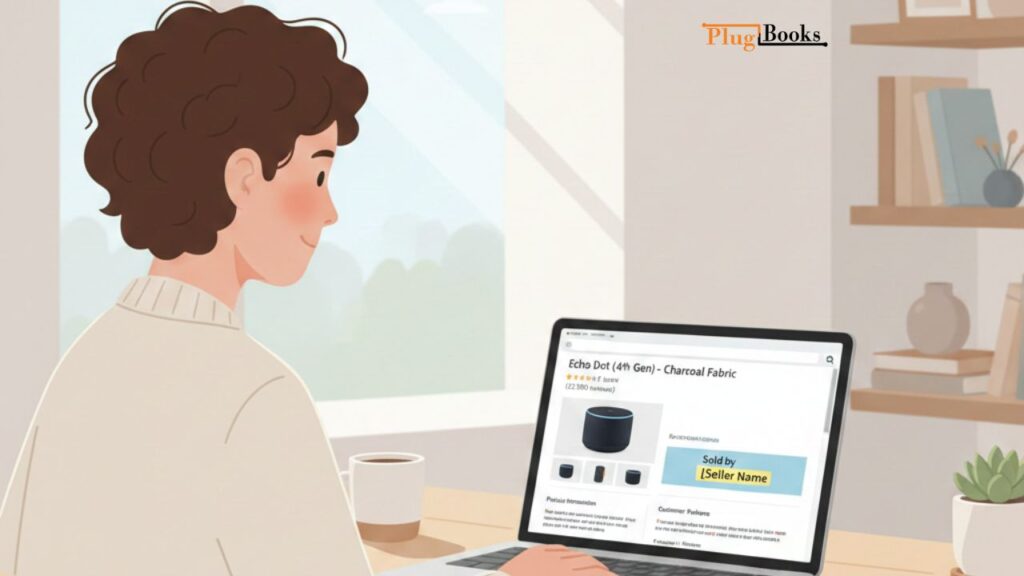
The easiest approach to discover a seller is to go to the product page:
- Go to the Amazon product page.
- Go to the part that says “Sold by [Seller Name].”
- To see the seller’s profile, click on their name.
The easiest approach to discover a seller is to go to the product page. If you want to make this process easier, you can use Amazon seller tools by PlugBooks to track sellers efficiently.
3. Method 2: Using “Other Sellers on Amazon”
There are more than one seller for some products. To see all the choices:
- On the product page, scroll down to “Other Sellers on Amazon.”
- Click on “See all buying options.”
- Check the pricing, delivery, and ratings of each vendor.
This is useful if you want to check the credibility of a vendor or compare them to locate the best offer.
4. Method 3: Getting the Amazon Seller ID
You might require the seller ID for more in-depth tracking or analysis. This is how:
- Copy the URL from the seller’s personal page.
- The Amazon seller ID is the string that comes after “seller=” in the URL.
- You can also use browser add-ons or tools called “Amazon seller finder” to get IDs rapidly.
If you want to keep track of more than one product from the same seller or use software like PlugBooks Amazon Seller App to manage your sales data, you need to know the Amazon seller ID.
5. Method 4: Using Amazon Seller Finder Tools
There are third-party programs called Amazon seller finding platforms that make it easier:
- Type in a keyword or a link to a product.
- The tool shows the seller(s), their IDs, and sometimes a list of their products.
- Helps you save time when you have to deal with a lot of products or markets.
Pro Tip: PlugBooks integrates with Amazon seller finder tools to track competitors, manage transactions, and keep precise records automatically.
6. Problems that often come up when looking for sellers
Finding a seller is easy, but you can run into some problems:
- Amazon handles some orders, which means the original vendor is hidden.
- It can be hard to keep track of sellers because they may have more than one account.
- Fake reviews can make purchasers think something is more reliable than it is.
Always double-check the information you get from sellers and use reputable solutions like PlugBooks to keep your data organized.
7. Tips for Security and Verification
- Make sure the seller is real and has a decent feedback score.
- Don’t take deals that look too good to be true.
- See if the seller answers queries quickly.
- Check the Amazon seller ID to make sure it’s real.
8. How PlugBooks Helps Sellers
PlugBooks is designed to make bookkeeping and seller management simple and efficient:
- Automatically track your finances by connecting with Xero and QuickBooks, reducing manual work.
- Manage multiple sellers and their products across platforms like Amazon, eBay, and Shopify.
- Import seller IDs and monitor competitor performance to make informed business decisions.
- Keep precise financial and inventory records, saving time and improving accuracy.
- Connect directly with your marketplace accounts to streamline bookkeeping and reporting.
USA Experience:
Many U.S. sellers, like Mark from California, use PlugBooks to manage both Amazon and Shopify stores. He imports all seller data automatically, tracks competitors, and reconciles his accounts with QuickBooks—cutting bookkeeping time in half.
9. Common Questions
Q1: Is it possible to find all of Amazon’s sellers?
A1: Most merchants are easy to see, but some products that are fulfilled by Amazon may disguise the original seller.
Q2: How can I tell if a seller is honest?
A2: Look at the seller’s feedback scores, review count, and history. You may check a vendor’s legitimacy by using their seller ID and tools like Amazon seller finder.
Q3: Is it possible for me to talk to a seller directly?
A3: Yes, you may do this by clicking “Contact Seller” on their personal page.
Q4: What if there are more than one vendor for a product?
A4: To compare pricing and vendors, go to the “Other Sellers on Amazon” area.
Q5: How can PlugBooks help you keep track of sellers?
A5: PlugBooks saves time and work by importing seller data, keeping track of transactions, and keeping an eye on what competitors are doing.
Q6: How do I find a seller on Amazon?
A6: To find a seller on Amazon, you can look at the product page, use “Other Sellers on Amazon,” find the seller ID, or use Amazon seller finder tools.
Q7: How to find Amazon seller ID?
A7: To get the Amazon seller ID, go to the seller’s profile, copy the URL, and check for the string that comes after “seller=”. You can also easily get it with tools like Amazon seller finder.
10. Quick Summary
How to look for a vendor on Amazon:
- How to find a seller on Amazon: Start from the product page, use the “Other Sellers” section, or find the seller ID.
- Use Amazon seller finding tools to get results faster.
- PlugBooks makes it easier to keep track of things and look at your competitors.

Final Thoughts
To make smart buying or selling decisions, you need to know how to find a seller on Amazon. Finding seller IDs and using tools like Amazon seller finder make the procedure easier than before. Adding PlugBooks to your workflow can help you keep track of things, do competitive analysis, and run your Amazon business better.
With PlugBooks, you can start looking for and keeping an eye on vendors right now!