



Understanding QuickBooks Bill Pay pricing doesn’t have to feel like reading a corporate tax manual. When you’re trying to figure out what your business is actually going to spend, looking at a flat monthly subscription fee rarely tells the whole story. Between variable payment methods, delivery speeds, and the specific quirks of your accounts payable workflow, costs can quietly sneak up on you.
QuickBooks structures Bill Pay to accommodate everything from one-person shops to fast-growing finance teams. Basic tiers come bundled with eligible subscriptions, while Premium and Elite introduce heavier governance and multi-tier approval controls.
Breaking down the actual tiers, transaction fees, and settlement speeds helps you figure out which setup actually makes sense for your bottom line.
What Does QuickBooks Bill Pay Pricing Include?
Looking at the sticker price alone won’t give you an accurate picture of your monthly spend. You really have to weigh your baseline subscription against transaction charges, settlement timelines, and the feature sets you actually use day-to-day.
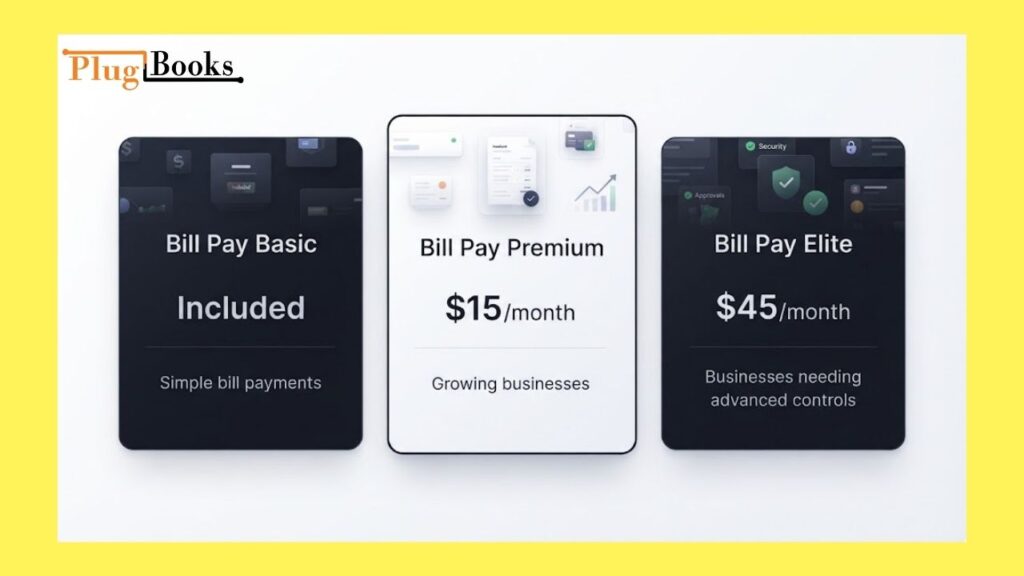
| Plan | Regular Monthly Price | Best For |
| Bill Pay Basic | Included with eligible QuickBooks subscriptions | Simple bill payments |
| Bill Pay Premium | $15/month | Growing businesses |
| Bill Pay Elite | $45/month | Businesses needing advanced controls |
Introductory discounts pop up all the time, so always double-check whether you’re looking at a temporary promo rate or the standard ongoing price to avoid nasty budget surprises later. Beyond the monthly fee, your payment habits drive the real costs. Standard ACH transfers won’t cost you an extra dime per payment, but fast tracks and physical checks will tack on separate fees.
What Does QuickBooks Bill Pay Basic Include?
If your disbursement routine is pretty straightforward, Bill Pay Basic comes right in the box with eligible QuickBooks subscriptions without adding any extra monthly overhead.
It’s a solid fit if you:
- Deal with a manageable number of vendor bills each month
- Stick mostly to standard ACH transfers
- Run things solo or use a simple, single-layer approval process
- Don’t need to lock down granular user permissions
- Just want your payments mapped cleanly into your general ledger
If your current process isn’t broken, paying for heavy-duty tier upgrades usually doesn’t make much sense. Take an honest look at how your team actually handles bills before paying for features you won’t touch.
How Much Is QuickBooks Bill Pay Premium?
QuickBooks Bill Pay Premium lists at a standard retail price of $15 per month.
This tier is built for growing companies juggling a wider network of active vendors and contractors. As your invoice volume climbs, the extra tooling makes keeping track of payouts a whole lot less painful.
Premium usually hits the sweet spot when you:
- Transact with a solid roster of suppliers regularly
- Need to cut checks or digital payments for independent contractors
- Process bills frequently throughout the month
- Need a bit more horsepower than the Basic tier offers
- Want a smoother, more structured accounts payable routine
If the time you save tracking down approvals and managing vendors outweighs the $15 monthly fee, the upgrade pays for itself.
How Much Does QuickBooks Bill Pay Elite Cost?
QuickBooks Bill Pay Elite runs $45 per month.
The real selling point here is control. Elite is tailored for businesses where the person entering a bill shouldn’t be the same person approving it or cutting the check.
It’s built for busier finance teams that need:
- Granular user roles and custom permissions
- Multi-step approval workflows before cash leaves the door
- Payment release sign-offs
- Full visibility over every stage of an invoice lifecycle
If you’re a solo operator running your own books, you can safely skip this. But if you have multiple people touching your finances and you need tight guardrails to prevent mistakes, the authorization workflows are well worth it. Plus, if you’re already running QuickBooks Online Advanced, Elite comes included natively.
What Are QuickBooks Bill Pay Transaction Fees?
Your monthly software subscription is only half the battle. The way you choose to move your money has a direct impact on your transaction expenses.
Standard ACH Payments
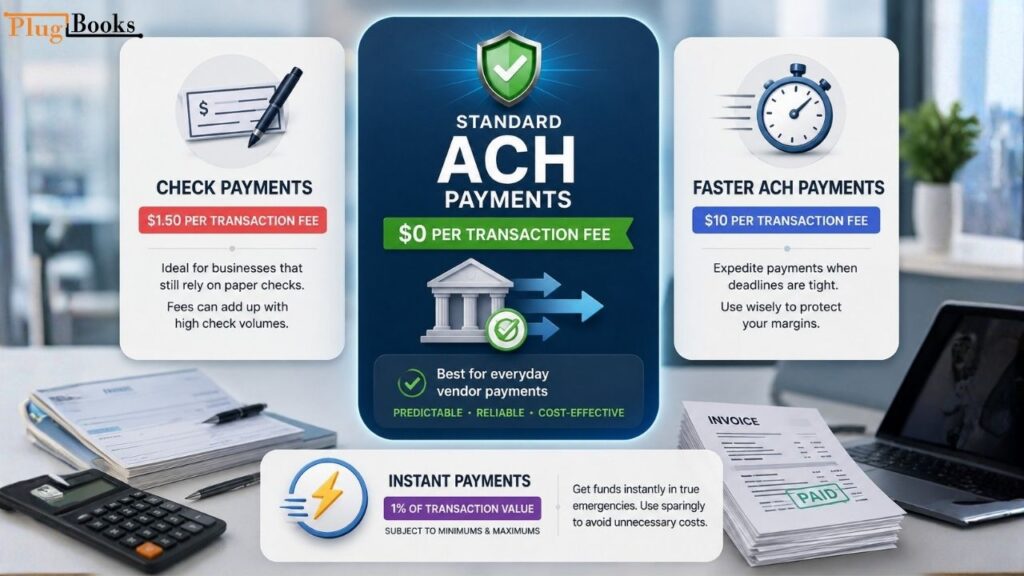
Standard ACH transfers carry a $0 per-transaction fee across every single Bill Pay tier. For everyday vendor management, this keeps your baseline overhead completely predictable, especially when suppliers aren’t banging down your door for instant cash.
Check Payments
If you still rely on paper checks, you’ll run into a $1.50 per-transaction fee. While it doesn’t sound like much on a single invoice, it adds up fast if you’re cutting dozens of checks every month. If you write a lot of physical checks, you definitely want to factor that into your monthly cash flow projections.
Faster ACH Payments
When a deadline sneaks up and standard processing timelines are too slow, Faster ACH lets you expedite the transfer for a flat $10 per transaction. Relying on this too often will quietly chew into your operating margins.
Instant Payments
Instant Payments take a percentage-based approach, charging 1% of the transaction value subject to baseline minimums and maximum limits. It’s a lifesaver for true emergencies, but you’ll want to use it sparingly to avoid wasting money on speed you don’t always need.
How Can You Look Up an Intuit Charge?
If you spot a weird charge from Intuit on your bank statement and aren’t sure where it came from, head straight to your QuickBooks billing dashboard, historical account logs, and subscription activity.
Match the transaction date and exact amount against your active service tier or recent Bill Pay activity to see if it’s a routine renewal or an ad-hoc fee. Keeping your digital receipt trails clean makes sorting out software subscriptions from payment add-ons a lot easier.
What Does QuickBooks Bill Pay Really Cost?
Your true monthly expense depends entirely on how heavily you lean on the platform. The math is pretty simple:
$$\text{Total Monthly Cost} = \text{Subscription Fee} + \text{Applicable Transaction Fees}$$
A business hanging out on the Basic tier using standard ACH might pay literally zero transaction overhead. Meanwhile, another company on that exact same plan could rack up a hefty bill simply because they rely heavily on physical checks or expedited transfers.
When you’re trying to budget, make sure you factor in:
- Your recurring monthly subscription cost
- How many vendor payments you process on average
- Whether you prefer digital rails or paper
- The total number of checks you mail out
- How often you lean on expedited or instant transfers
- Whether your team needs multi-user approval gates
Looking past the headline subscription price gives you a much truer reflection of what running your accounts payable actually costs.
How Long Do QuickBooks Bill Pay Payments Take?
Settlement speed dictates how tightly you have to manage your cash flow.
- Standard ACH transfers usually take about 3 to 5 business days to clear.
- Physical check disbursements take roughly 8 to 10 business days from printing to final clearing.
- Accelerated rails compress those windows down significantly, but you’ll pay extra for the convenience.
Planning ahead and scheduling bills a few days before they’re due keeps you comfortably inside standard processing windows so you aren’t forced to pay for expedited fees.
Which QuickBooks Bill Pay Plan Is Best for Small Businesses?
The right tier comes down to your actual operational scale, not guesswork.
Basic for Simple Payment Needs
Stick with Basic if you:
- Process a light load of monthly bills
- Rely almost exclusively on standard ACH
- Run your books entirely on your own
- Have zero need for multi-tier sign-off rules
Premium for Growing Businesses
Step up to Premium if you:
- Pay a growing roster of suppliers every month
- Send regular payouts to independent contractors
- Watch your invoice volume tick upward steadily
- Need better tracking tools to stay organized

Elite for Advanced Payment Controls
Upgrade to Elite if you:
- Need strict separation of duties across multiple employees
- Require formal, multi-stage invoice sign-offs
- Want management authorization before money leaves the bank
- Need robust internal controls to protect your cash flow
Matching your software tier to your actual day-to-day workflow keeps your overhead lean and purposeful.
How Can You Review Your Payment Patterns?
Keeping a lid on disbursement expenses is mostly about building good habits.
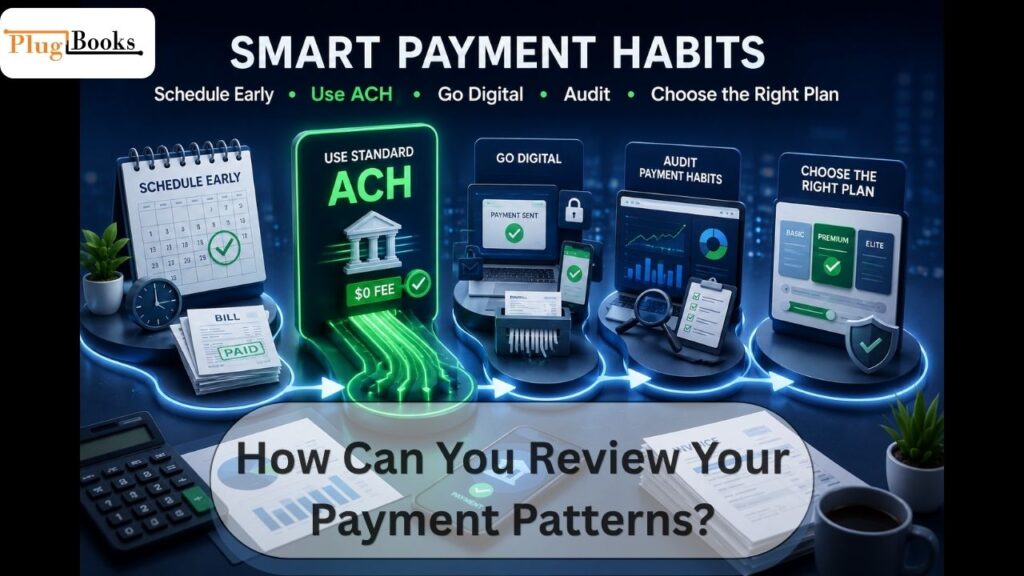
- Schedule bills early: Getting ahead of due dates means you won’t have to scramble for expensive expedited transfers.
- Lean on standard ACH: Route payments through standard rails whenever your vendors allow it to wipe out per-transaction fees.
- Ditch paper checks: Push suppliers toward digital payment methods to cut out those annoying per-item fees.
- Audit your habits: Keep an eye on how often you’re using Faster ACH, Instant Payments, or physical checks so you can tighten up your scheduling lead times.
- Right-size your subscription: Only jump to a higher tier when your internal controls or workflow bottlenecks genuinely demand it.
What Should You Consider Before Choosing a Plan?
Before you lock into a tier, run through a quick mental checklist of your operations:
- Payment volume: Roughly how many bills cross your desk each month?
- Team size: Are you flying solo, or do multiple people touch the billing workflow?
- Approval hierarchy: Do expenditures require a manager or owner’s blessing?
- Vendor preferences: Do your suppliers happily accept digital rails, or are they stuck on paper checks?
- Lead times: Can your team realistically schedule payments days in advance?
- Accounting integration: Do your payment statuses need to sync seamlessly into your broader ledger?
How Does Bill Pay Fit Into Your Accounting Workflow?
Paying vendors is just one piece of a much larger bookkeeping puzzle. A healthy financial setup has to handle:
- Recording incoming sales data
- Tracking day-to-day business expenses
- Reconciling monthly bank feeds
- Managing accounts payable and receivable
- Monitoring marketplace commissions and platform fees
- Logging net payouts
- Generating clean financial reports
If you sell across channels like Amazon, Shopify, eBay, or other marketplaces, your accounting naturally gets a bit messy as sales channels, gateway fees, refunds, and merchant payouts start fragmenting your data. Tools like PlugBooks help clean up eCommerce transaction data by aligning marketplace sales with your underlying accounting workflows, keeping your numbers consistent across every sales channel. Choosing a disbursement platform should always tie back into that bigger-picture financial strategy.

Is QuickBooks Bill Pay Worth It?
QuickBooks Bill Pay is a strong option if you want your vendor payouts and general ledger living under the exact same roof.
It delivers real value when your company:
- Processes a steady stream of vendor invoices
- Disburses regular compensation to contractors
- Needs crystal-clear audit trails
- Demands structured approval routing
- Wants to cut out manual bookkeeping busywork
Smaller operations with light accounts payable needs will do just fine on Basic, while scaling teams will appreciate the governance built into Premium and Elite. Balancing your subscription costs, transaction fees, and workflow needs will point you right toward the option that fits best.
FAQs
Is the Basic plan available at no extra cost?
For eligible subscribers, the entry-level option is included with their subscription. Higher tiers have monthly charges, while some payment methods may add separate processing costs.
What is the monthly price of the Premium tier?
The mid-level package is typically priced at $15 per month. Promotional or introductory offers may occasionally change what new users pay.
What does the Elite package cost?
The highest tier is generally listed at $45 per month. Under current packaging, some QuickBooks Online Advanced subscribers may receive this level as part of their subscription.
Do regular ACH bank transfers have a processing fee?
No. Standard bank-to-bank ACH payments are generally processed without a per-transaction charge across the available tiers.
What is the fee for paying a vendor by check?
Sending a payment by paper check costs a flat $1.50 per transaction.
How expensive is an expedited ACH transfer?
Businesses that need funds delivered faster can use the accelerated transfer option for $10 per transaction.
Is there a fee for sending money instantly?
Yes. Real-time payments are charged at 1% of the transaction amount, subject to applicable minimum and maximum limits.
Which payment package works best for a small business?
The right choice depends on payment volume and workflow needs. Smaller operations may prefer a simple setup, growing teams can benefit from additional features, and larger organizations may need stronger approval controls.