



Managing money for an online store is very different from running a traditional brick-and-mortar shop. Proper ecommerce accounting helps you track sales, manage inventory, and understand your actual profitability across multiple channels.
Whether you are launching your first storefront or scaling an established brand across Shopify, Amazon, and eBay, mastering your financial workflow is essential for sustainable growth.
What Is Ecommerce Accounting?
At its core, ecommerce accounting is the systematic process of recording, organizing, and analyzing the financial transactions of an online business. Unlike basic bookkeeping, which focuses strictly on recording daily sales and expenses, comprehensive ecommerce financial management gives you a clear picture of your company’s health.
Key Components of Online Store Accounting
- Sales Revenue: Track gross and net sales across channels.
- Expenses: Record operating, software, and marketing costs.
- Marketplace Fees: Track commissions and platform charges.
- Payment Fees: Record transaction fees from payment gateways.
- Refunds & Returns: Log refunds and related costs.
- Taxes: Track sales tax and tax obligations.
- Inventory: Monitor stock value and COGS.
- Shipping & Fulfillment: Track delivery, 3PL, and packaging costs.
- Marketplace Payouts: Reconcile deposits with sales.
- Profit & Loss: Monitor revenue, costs, and net income.
How Is Financial Data Managed in Ecommerce?
Ecommerce accounting is not just about recording sales. It is an ongoing financial cycle that turns raw transaction data into information you can use to make better business decisions.
Managing an online store’s finances typically involves four main stages:
- Capture financial activity: Collect transaction data from your online stores, marketplaces, payment processors, banks, and expense accounts.
- Organize the data: Classify revenue, fees, refunds, inventory costs, advertising, shipping, and other expenses into the appropriate accounts.
- Verify and reconcile: Compare recorded transactions with marketplace settlements and bank deposits to identify missing or incorrect entries.
- Review financial performance: Use financial statements and reports to evaluate revenue, expenses, cash flow, margins, and overall profitability.
This cycle continues throughout the month rather than being a one-time bookkeeping task. Keeping each stage organized makes it easier to spot discrepancies, prepare accurate reports, and understand how the business is performing.
Why Do Online Sellers Face Unique Accounting Challenges?
Traditional brick-and-mortar businesses usually record straightforward point-of-sale transactions. In contrast, online sellers face unique hurdles that make ecommerce bookkeeping significantly more complex.
- High Transaction Volume: Selling online often means dealing with hundreds or thousands of low-dollar transactions daily.
- Multiple Sales Channels: Selling on Shopify, Amazon, and eBay simultaneously creates siloed data streams.
- Marketplace Commissions and Fees: Platforms deduct referral fees, storage fees, and advertising costs before you ever see your payout.
- Payment Processing Delays: Payout schedules rarely match the exact date a customer places an order.
- Global Shipping and Logistics: Managing international freight, customs duties, and 3PL warehousing adds layers of expense tracking.
- Complex Inventory Cycles: Stock spread across multiple fulfillment centers (like Amazon FBA) complicates inventory valuation.
- Multi-Currency Transactions: Selling internationally introduces foreign exchange fluctuations and conversion fees.

What Should Ecommerce Businesses Track?
Keeping your books organized requires monitoring specific financial buckets. The table below outlines what online sellers must track and why each category matters:
| Financial Area | What Ecommerce Sellers Should Track | Why It Matters |
| Sales | Gross and net sales | Shows total revenue before and after discounts and returns. |
| Fees | Marketplace and payment fees | Ensures you know your true cost of selling on third-party platforms. |
| Refunds | Customer refunds and returns | Prevents you from paying taxes on revenue you had to give back. |
| Inventory | Stock and inventory costs | Determines your cost of goods sold and prevents stockouts or dead stock. |
| Shipping | Fulfillment and delivery costs | Reveals whether your shipping pricing strategy is eating your profits. |
| Taxes | Collected and payable taxes | Keeps your business compliant with state and federal tax authorities. |
| Payouts | Marketplace deposits | Crucial for reconciling your bank account with your sales platforms. |
| Expenses | Operating expenses | Highlights overhead costs like software, marketing, and office supplies. |
| Profit | Revenue minus expenses | The ultimate metric showing whether your business is actually making money. |

Which Financial Indicators Should Online Sellers Monitor?
Tracking financial data is only useful when you know what the numbers tell you. Ecommerce sellers should pay particular attention to metrics that show whether sales are translating into sustainable profit.
Some useful metrics include:
- Gross profit margin: Shows how much revenue remains after the cost of products sold.
- Net profit margin: Helps measure profitability after operating expenses and other costs.
- Average order value: Shows how much customers typically spend per order.
- Cost of goods sold: Helps determine the direct cost associated with products sold.
- Operating expenses: Reveals how much the business spends to keep running outside of product costs.
- Channel profitability: Helps compare performance across marketplaces and storefronts.
Looking at these figures together gives ecommerce sellers more context than revenue alone. A store can generate strong sales while still producing weak profits if fees, advertising, fulfillment, or inventory costs are too high.
What Software Do Ecommerce Businesses Use for Bookkeeping?
Financial software for ecommerce businesses is built to manage the unique accounting needs of online retailers.
Online sellers rely on these systems to automate tedious tasks. Key capabilities include:
- Sales Data Syncing: Automatically pulling daily orders, taxes, and shipping fees from sales channels.
- Expense Tracking: Capturing digital receipts and supplier bills in one central dashboard.
- Transaction Categorization: Automatically sorting income and outlays into appropriate ledger accounts.
- Payout Reconciliation: Matching multi-order marketplace payouts to a single bank deposit.
- Financial Reporting: Generating instant profit-and-loss statements tailored for online retail.
- Multi-Channel Support: Consolidating financial data from Shopify, Amazon, and other marketplaces.
- Accounting Integrations: Connecting seamlessly with core ledgers like QuickBooks and Xero.
What Makes the Best Accounting Software for Ecommerce?
Choosing the best accounting software for ecommerce means finding a solution that handles multichannel sales and high transaction volumes. Look for:
- Ecommerce Integrations: Connects your stores and marketplaces.
- Automation: Syncs sales, fees, and transactions automatically.
- Reconciliation: Matches batch payouts accurately.
- Multi-Channel Support: Handles multiple selling platforms.
- QuickBooks & Xero Compatibility: Works with major accounting platforms.
- Accurate Reporting: Tracks revenue, COGS, and shipping costs.
- Scalability: Grows with your order volume.
- Ease of Use: Simple interface and reporting.
- Pricing & Value: Features justify the subscription cost.
How to Integrate an Ecommerce Store With Accounting Software
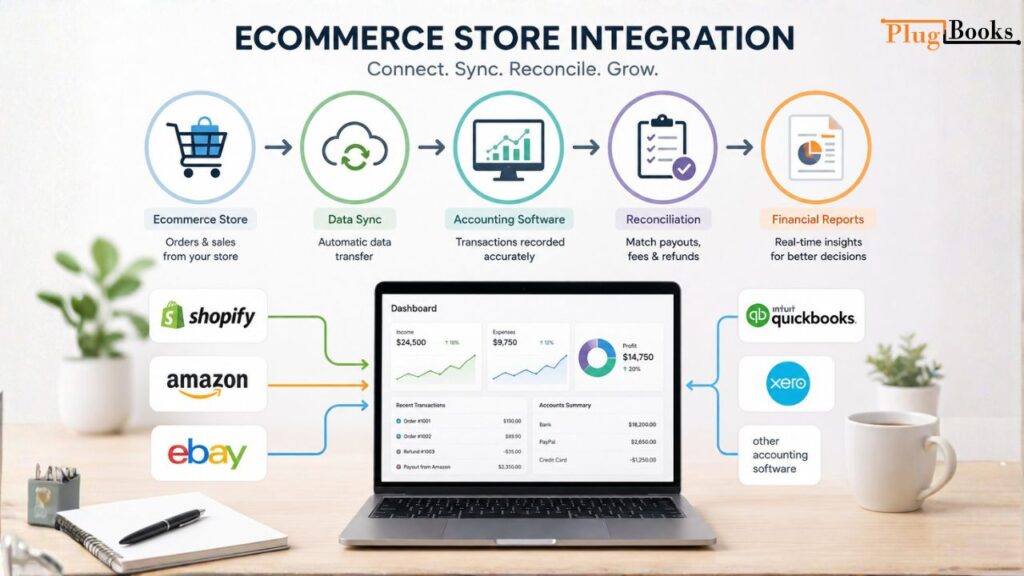
Manual data entry can lead to burnout and costly errors. An accounting integration for ecommerce stores creates a seamless connection between your digital storefront and financial records.
The Integration Workflow
Ecommerce Store → Data Sync → Accounting Software → Reconciliation → Financial Reports
Connecting Popular Platforms
- Shopify Accounting Integration: Syncs daily summaries or individual orders, tracking product revenue, shipping collected, and Shopify Payments fees automatically. Check out our guide on Shopify accounting and bookkeeping for more details.
- Amazon Accounting Integration: Handles complex Amazon settlement reports, capturing FBA storage fees, advertising costs, and multi-channel payouts. Learn more via our Amazon seller bookkeeping resources.
- eBay Accounting Integration: Consolidates auction and fixed-price sales, managing Managed Payments payouts seamlessly.
Automated integration eliminates the need to export CSV files and manually punch numbers into spreadsheets, ensuring your books are always up to date.
What Can Ecommerce Sellers Automate in Their Bookkeeping?
Automated bookkeeping can transform how online sellers manage their back-office tasks. Instead of spending weekends matching receipts, automation streamlines the entire financial workflow:
- Automated Transaction Syncing: Orders flow from your checkout to your ledger in real time.
- Reduced Manual Data Entry: Minimizes human error and frees up hours of administrative time.
- Faster Reconciliation: Matches multi-order deposits instantly.
- Fewer Spreadsheet Errors: Eliminates broken formulas and misplaced decimal points.
- Centralized Financial Information: Keeps all historical data accessible in one secure cloud dashboard.
- Easier Reporting: Produces tax-ready financials with the click of a button.
- Better Scalability: Allows you to handle 10x more orders without hiring an army of bookkeepers.
Do I Need an Accountant for My New Ecommerce Business?
Many startup founders wonder: do I need an accountant for my new ecommerce business?
The short answer is: not necessarily on day one. For many early-stage sellers, combining modern ecommerce bookkeeping software with built-in automation can handle routine daily tracking, categorization, and reporting without professional help.
However, you should consider bringing in a certified public accountant (CPA) or specialized ecommerce bookkeeper when you encounter:
- Complex Tax Situations: Multi-state economic nexus thresholds or international VAT/GST registration.
- Rapid Business Growth: Scaling inventory lines or managing venture capital funding.
- Multiple Legal Entities: Operating sister companies or international subsidiaries.
- Complex Inventory Models: Dealing with multi-warehouse manufacturing and complex COGS calculations.
- High Transaction Volumes: Processing thousands of monthly orders where manual oversight fails.
Disclaimer: This guide is for educational purposes and does not constitute formal legal or tax advice. Always consult a qualified tax professional regarding your specific situation.
How to Track Ecommerce Sales and Expenses
To maintain financial clarity, you must organize your incoming and outgoing funds into logical categories.
- Revenue: Separate gross product sales from shipping fees charged to customers and gift card sales.
- Marketplace Fees: Isolate referral fees, subscription plans, and sponsored product ads.
- Payment Fees: Track the percentage-plus-fixed-fee charges taken by payment gateways.
- Shipping & Fulfillment: Monitor carrier charges (UPS, FedEx, DHL), packaging materials, and 3PL storage fees.
- Inventory: Track purchase orders, supplier shipping costs, and damaged stock write-offs.
- Advertising: Group your marketing spend across channels like Meta, Google, and TikTok.
- Refunds: Keep a dedicated ledger account for customer returns so you can analyze product quality issues.
Always distinguish between gross sales (total revenue before deductions), fees, refunds, net sales, and actual payouts hitting your bank account.
How to Reconcile Ecommerce Transactions
Ecommerce payout reconciliation is the process of verifying that your financial records match your actual bank deposits. Because payment processors and marketplaces group multiple orders into a single lump-sum payout minus fees, reconciliation can be tricky.
Step-by-Step Reconciliation Checklist
- Compare Store Records: Pull your sales summary report from Shopify, Amazon, or eBay for a specific payout period.
- Match Payouts: Locate the corresponding deposit in your business bank account.
- Check Fees: Verify that platform fees, refunds, and advertising costs deducted by the marketplace match your accounting ledger.
- Identify Refunds: Ensure returned items are accounted for within that same payout cycle.
- Find Discrepancies: Flag any missing transactions or unexpected adjustments immediately.
- Review Transaction Dates: Ensure timing differences (like weekend payouts) do not skew your monthly close.
- Maintain Accurate Records: Lock the reconciled period to protect historical data integrity.
What Accounting Mistakes Should Ecommerce Sellers Avoid?
- Mixing Personal & Business Expenses: Keep accounts separate.
- Ignoring Marketplace Fees: Track all platform and payment fees.
- Incorrect Sales Records: Record sales, refunds, and discounts accurately.
- Skipping Payout Reconciliation: Match deposits with sales records.
- Poor Inventory Tracking: Monitor inventory costs and COGS.
- Overusing Spreadsheets: Automate bookkeeping as you grow.
- Misclassifying Expenses: Use clear expense categories.
- Poor Record Keeping: Organize receipts, invoices, and reports.
How PlugBooks Helps Simplify Online Store Bookkeeping?
Managing finances across multiple online sales channels doesn’t have to consume your entire week. PlugBooks is designed to bridge the gap between digital storefronts and your financial ledgers.
Here is how PlugBooks helps online sellers streamline their workflows:
- Connects Sales Channels: Easily link your store data from platforms like Shopify and Amazon into your accounting environment.
- Automates Financial Syncing: Automatically syncs sales, refunds, taxes, and shipping data without manual CSV uploads.
- Reduces Manual Entry: Cuts down on repetitive bookkeeping tasks so you can focus on marketing and product development.
- Organizes Sales and Fees: Breaks down gross revenue, marketplace commissions, and payment processing fees clearly.
- Simplifies Reconciliation: Helps match marketplace lump-sum payouts to individual orders effortlessly.
- Supports Standard Ledgers: Integrates smoothly with popular accounting ecosystems like QuickBooks and Xero.
Ready to take control of your online store finances? Explore how PlugBooks can automate your bookkeeping workflow and give you back your time.

Frequently Asked Questions
When should an ecommerce business start using accounting software?
It is best to establish an organized system early, ideally as soon as you begin processing regular orders or selling across multiple channels, to prevent cumbersome cleanup later.
Can ecommerce accounting automation replace a human accountant?
Automation streamlines daily record-keeping and reconciliation, but complex multi-state tax setups, corporate structuring, and strategic financial planning still benefit from professional CPA guidance.
Why do bank deposits not match my daily store sales?
Marketplaces and payment processors accumulate several days of transactions, deduct fees and refunds, and deposit lump-sum payouts, creating a timing and net-amount variance.
What is the difference between ecommerce bookkeeping and accounting?
Bookkeeping focuses mainly on recording, categorizing, and organizing daily financial transactions, whereas accounting uses that clean data for high-level analysis, tax preparation, reconciliation, and financial reporting.
How often should an online seller reconcile payouts?
Reconciling your payouts on a weekly or monthly basis is recommended to quickly catch missing fees, unexpected adjustments, or customer returns before they complicate your monthly close.
What features matter most in ecommerce accounting software?
Look for automated multi-channel sales syncing, native integrations with platforms like Shopify and Amazon, smooth compatibility with QuickBooks or Xero, and reliable batch-payout reconciliation capabilities.
What are ecommerce platforms with top accounting support?
Ecommerce platforms with strong accounting support make it easier to connect sales data with accounting software, automate financial workflows, and keep records organized across multiple sales channels.
What are accounting automation platforms with unlimited support?
Accounting automation platforms help reduce manual bookkeeping by syncing transactions, organizing financial data, and simplifying reconciliation. When comparing providers, also consider integration options, support quality, scalability, and the features included in the plan.
How do you integrate an ecommerce store with accounting software?
To integrate an ecommerce store with accounting software, connect your online store to a compatible accounting platform or integration tool. The connection can sync sales, fees, refunds, taxes, and payout data, reducing manual data entry and making reconciliation easier.