



Scaling an e-commerce brand requires tapping into high-volume, recurring revenue streams. If you want to scale past retail consumers, learning how to sell as an Amazon Business seller is one of the smartest moves you can make. The Amazon Business (B2B) marketplace opens doors to corporate buyers, educational institutions, hospitals, and government agencies that purchase in bulk.
Unlike traditional retail selling, B2B e-commerce focuses on long-term relationships, volume pricing, and tax-exempt transactions. Whether you are transitioning an existing storefront or launching a brand-new professional account, mastering this ecosystem can drastically transform your revenue potential.
Table of Contents
- What Is Amazon Business (B2B)?
- Benefits of Selling to B2B Buyers on Amazon
- Requirements to Get Started
- Step-by-Step Guide: How to Set Up Your B2B Account
- B2B vs. B2C Selling: Key Differences
- Best Practices for Pricing and Inventory
- Expert Tips for Maximizing B2B Sales
- Common Mistakes to Avoid
- Frequently Asked Questions (FAQs)
- Conclusion & Call to Action
What Is Amazon Business (B2B)?
Amazon Business is a specialized marketplace designed specifically for business-to-business transactions. It connects wholesale suppliers, brand manufacturers, and third-party merchants with verified business purchasers.
When you register as a B2B seller, your product catalog becomes visible to corporate buyers who enjoy features like multi-user accounts, automated invoicing, and corporate payment methods. You do not need a separate seller central account; instead, you unlock B2B features directly within your Professional Selling Plan.
Benefits of Selling to B2B Buyers on Amazon
Expanding into the corporate sector offers unique operational advantages that retail markets rarely provide:
- Higher Order Volumes: Businesses routinely purchase inventory, office supplies, and equipment in bulk rather than single units.
- Repeat Purchasing: Corporate buyers establish routine supply needs, leading to predictable, recurring reorders.
- Reduced Price Sensitivity: While consumers constantly hunt for the lowest price, businesses prioritize reliability, fast shipping, and invoicing convenience.
- Tax Exemption Automation: Amazon automatically handles tax-exempt certificates for qualifying organizations, minimizing your compliance burden.

Requirements to Get Started
Before you can unlock B2B features, you must meet specific platform criteria:
- Professional Selling Plan: You must upgrade from an Individual plan to a Professional Seller account (costing a monthly subscription fee).
- Good Account Health: Your Order Defect Rate (ODR) and late shipment rates must comply with Amazon’s strict performance targets.
- Tax and Business Documentation: Valid business registration, tax identification numbers, and banking details are required.
Step-by-Step Guide to Sell as an Amazon Business Seller
Transitioning your store into a corporate-friendly channel involves a few clear configuration steps:
Step 1: Upgrade to a Professional Account
Navigate to your Seller Central settings and ensure your account type is set to Professional.
Step 2: Enable B2B Features
Go to the B2B tab in Seller Central. Opt-in to B2B features to unlock business pricing, quantity discounts, and restricted B2B product listings.
Step 3: Establish Business Pricing and Quantity Discounts
Set up tiered pricing structures. For example, offer a 5% discount for orders of 10+ units and a 10% discount for orders of 50+ units.
Step 4: Optimize Product Listings for Search
Incorporate business-centric keywords, detailed specifications, safety data sheets (if applicable), and clear product dimensions into your descriptions.
B2B vs. B2C Selling: Comparison
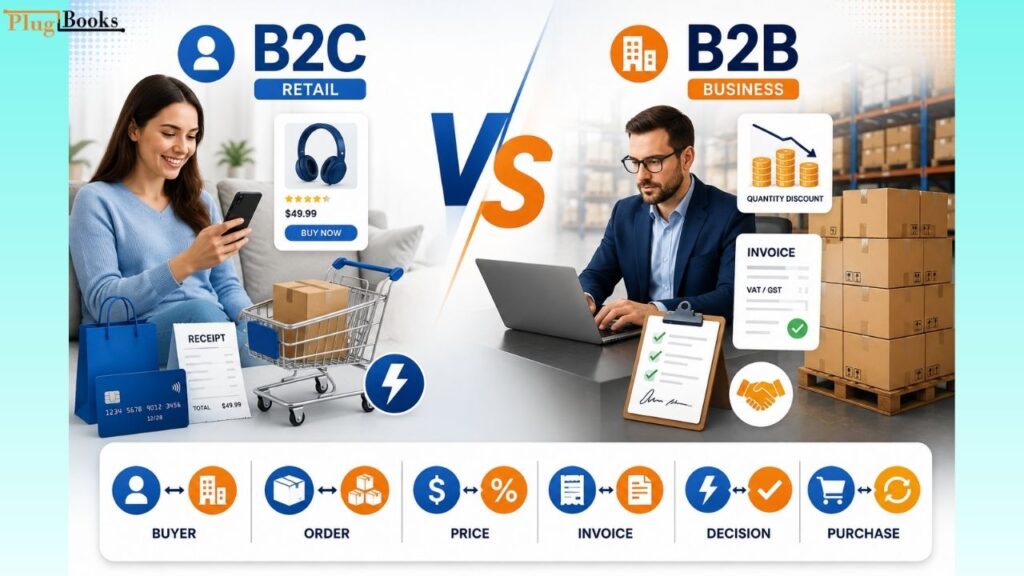
| Feature | B2C (Retail) | B2B (Amazon Business) |
| Buyer Type | Individual consumers | Verified businesses, institutions, government |
| Order Size | Usually 1 unit | Bulk quantities (multi-packs, cases) |
| Pricing Strategy | Competitive consumer pricing | Quantity discounts and tier pricing |
| Invoicing | Standard consumer receipts | Enhanced corporate VAT/GST invoices |
| Decision Cycle | Impulse or quick research | Procurement approvals, recurring orders |
Expert Tips for Maximizing B2B Sales
- Leverage Fulfilled by Amazon (FBA): Many corporate buyers filter searches exclusively for Prime-eligible items to guarantee fast, reliable delivery.
- Provide Enhanced Content: Upload user manuals, installation guides, and specification sheets directly to your listings to answer procurement questions instantly.
- Monitor Analytics: Use Amazon’s B2B analytics reports to track corporate sales trends, top-selling SKUs, and buyer demographics.
Why Amazon Business Sellers Need Automated Accounting
As your Amazon Business sales grow, managing finances becomes more complex. Bulk orders, recurring B2B purchases, marketplace fees, taxes, refunds, and payouts can quickly make manual bookkeeping difficult. This is where PlugBooks helps Amazon sellers simplify their accounting workflow.
PlugBooks automatically syncs your Amazon transactions with QuickBooks and Xero, organizing sales, fees, taxes, refunds, and settlements into accurate financial records. Instead of manually importing reports or reconciling payouts, sellers can automate their bookkeeping, reduce accounting errors, and gain real-time visibility into business performance. Whether you’re selling to individual customers or expanding through Amazon Business, PlugBooks helps keep your financial records accurate so you can focus on growing your store instead of managing spreadsheets.

Common Mistakes to Avoid
- Neglecting Quantity Disclosures: Failing to offer attractive tier pricing drives corporate buyers toward competitors who reward bulk purchases.
- Ignoring Tax Compliance: Not setting up automated tax exemption management can lead to severe accounting and legal hurdles.
- Poor Inventory Planning: B2B buyers purchase in massive spikes. Running out of stock during a corporate reorder cycle damages your seller ranking.
Frequently Asked Questions (FAQs)
1. Do I need a separate account to sell B2B on Amazon?
No, you use your existing Professional Seller Central account. You simply opt-in to the B2B features within your dashboard.
2. How do quantity discounts work?
Quantity discounts allow you to set lower per-unit prices when business buyers purchase designated threshold quantities of your product.
3. How are business taxes handled?
Amazon manages tax exemption documentation automatically through its tax calculation services for verified tax-exempt organizations.
4. Can I sell both B2C and B2B items simultaneously?
Yes. Your listings will automatically display consumer pricing to regular shoppers and business pricing (plus discounts) to verified B2B buyers.
5. What are the fees for selling B2B on Amazon?
You pay your standard Professional Seller subscription fee and standard referral fees. There are no extra hidden platform fees for utilizing B2B tools.
6. Do corporate buyers pay faster than regular consumers?
Amazon processes payments for B2B orders through the same secure disbursement cycles as standard retail orders.
7. How do I attract corporate buyers to my listings?
Offer competitive bulk pricing, ensure fast shipping via FBA, and provide thorough technical documentation in your product descriptions.
8. Are there restrictions on what I can sell to businesses?
Most standard categories are open, but certain restricted goods may require compliance certifications, safety sheets, or wholesale authorization.
Conclusion
Learning how to sell as an Amazon Business seller unlocks a powerful engine for predictable, high-volume growth. By moving beyond traditional retail and catering directly to corporate procurement needs, you can secure bulk orders, build recurring revenue, and elevate your brand’s market authority.