




Amazon advertising login gives sellers access to their Amazon Ads account, where they can manage campaigns, review ad performance, monitor spending, and access advertising reports. For Amazon sellers, however, managing ads is only part of the process. Keeping advertising costs organized alongside sales, Amazon fees, COGS, refunds, and other expenses is also important for understanding actual business profitability.
Once you access the Amazon Ads Console, you can review your advertising activity and gather useful cost and performance data. Combining this information with organized ecommerce bookkeeping can give you a clearer view of how advertising affects your overall financial results.
What is an amazon advertising login?
The amazon advertising login is the act of signing into your Amazon Ads account. Upon login, sellers are taken to the Amazon Ads environment, where they are able to control their advertising operations and monitor campaign information.
Depending on your account and advertising settings, the platform can give you access to campaign management, metrics for performance, reporting, and other advertising tools.
The login itself just gives you access to your account. Once you login in, you can manage and analyse your advertising activity in the Amazon Ads Console.
If you are asking what Amazon PPC is, it stands for pay-per-click advertising, where advertisers typically pay when shoppers click on their ads. Amazon offers PPC-based advertising opportunities for sellers to promote their products.
How to Access Your Amazon Ads Account
The general methods to access your advertising account are:
- Log in to the Amazon Ads website.
- Enter your advertising account credentials.
- Complete any security check that’s required.
- Log in to your account.
- Open the Ads Console or advertising dashboard.
- Pick the campaign, report or advertising feature you wish to view.
If you are managing numerous Amazon brands or accounts, verify campaign data and reports against the correct advertising profile.
Knowing how to leverage the Amazon advertising platform can help sellers go beyond campaign launches. The Ads Console gives you campaign management, performance statistics, budgets, targeting and reporting capabilities.
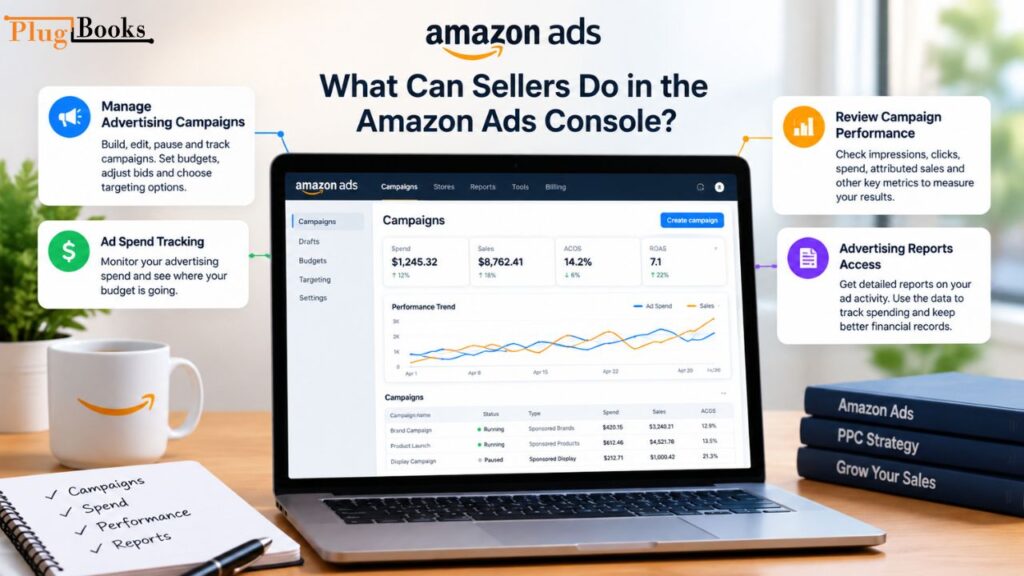
What Can Sellers Do in the Amazon Ads Console?
After logging in, you’ll find options in the Amazon Ads Console for managing and reviewing advertising activities.
Manage Advertising Campaigns
Sellers may build, edit, pause and track campaigns to suit their advertising strategy. Campaign management may involve setting budgets and changing bids, and selecting targeting options.
Ad Spend Tracking
Advertising spend is a key company expense. Regularly reviewing campaign expenses can assist sellers understand where their advertising budget is going.
Review Campaign Performance
Sellers can evaluate analytics including impressions, clicks, spend, attributed sales and other performance statistics accessible. Such figures may be useful in demonstrating the relation between activity in advertising and sales of products.
Advertising Reports Access
Reports provide more detailed information on advertising activity. Sellers may evaluate spending and keep better financial records using the data.
Sellers also need to know how to properly monitor Amazon advertisements. Reviewing clicks, impressions, advertising spend, attributed sales and other available analytics can assist them comprehend campaign activity.
What Amazon Advertising Costs Should Sellers Track?
You should never look at advertising costs independently from the rest of your ecommerce expenditures. When determining the profitability of a firm, a seller may have to account numerous types of costs.
Some things to watch out for are:
- Advertising spend
- Sponsored ad costs
- PPC expenses
- Campaign-related costs
- Amazon selling fees
- Referral fees
- Fulfillment expenses
- Refunds and returns
- Product costs and COGS
- Other operating expenses
Organising this information makes it easy to comprehend the difference between revenue and actual profit.
Many sellers wonder, “How much should I spend on Amazon advertising?” However, there isn’t a one-size-fits-all advertising budget. Spending might be based on things like product margins, competition, marketing goals, and sales targets.
Why Amazon Ad Spend Is Important For Tracking Profit
A product may sell strongly, but if you spend a lot on promotion and other expenses, you could not make as much profit as you intended.
Say, for instance, an Amazon product achieves $20,000 in sales in one month. That revenue isn’t the seller’s bottom line. Amazon fees, advertising charges, product costs, refunds, shipping-related expenses and other business costs can diminish the amount left over.
This is why sellers should not look at sales data alone to evaluate how their firm is performing.
Tracking your advertising spend against your revenue and other expenses offers you a more full picture of the financial health of your ecommerce business. It can also help discover which costs are impacting profits.
How Bookkeeping Helps Organize Amazon Advertising Expenses
Advertising data is useful for marketing decisions. Bookkeeping compiles financial data for the full firm.
A systematic bookkeeping method can help Amazon merchants organise:
- Sales and orders
- Amazon fees
- Advertising expenses
- Refunds
- Payouts and settlements
- COGS
- Business expenses
- Profit information
Sellers can retain records that support a broader view of financial performance, rather than looking at advertising costs independently from sales and other expenses.
This can be particularly advantageous for merchants selling through multiple ecommerce platforms, who want their financial data organised in a similar manner.
Monitor Amazon Advertising Costs With PlugBooks
PlugBooks helps online businesses organise their financial data so that they can keep better track of sales, fees, expenses, COGS, payments and profitability.
For Amazon sellers, marketing spend is one aspect of a wider financial puzzle. PlugBooks can assist bring together Amazon transaction data and other bookkeeping information to make it easier to keep your records organised.
PlugBooks may be used to enable bookkeeping procedures for Amazon, eBay and Shopify, while linking your data with QuickBooks or Xero.
Instead, you can preserve advertising expenditure as part of a larger bookkeeping process that includes sales, fees, expenses, COGS, and other financial data, instead of treating it as an isolated marketing statistic.
Want to streamline your ecommerce bookkeeping? Download PlugBooks for free and keep your financial information organised.

Final Thoughts
The amazon advertising login allows retailers to access their amazon ads account and the tools they need to manage advertising activity. Sellers can use the Ads Console to monitor campaigns, examine expenditure, analyse performance and access advertising reports.
But understanding ad performance is only one facet of running an ecommerce business. To evaluate how advertising impacts your bottom line, you have to look at those charges alongside Amazon sales, fees, COGS, refunds, settlements, and other expenses.
With an organised bookkeeping procedure and solutions such as PlugBooks, Amazon sellers may maintain their financial records structured and gain a clearer insight of their overall business performance.
Frequently Asked Questions
1. How can I get into my Amazon advertising account?
Sign in to the Amazon Ads sign-in page with the login credentials linked with your advertising account. Once authenticated, you will be able to access the advertising options offered and campaign details.
2. What is the difference between Amazon advertising login and Amazon Ads Console?
No. Amazon advertising login is the login of the account. Amazon Ads Console is the platform after login for advertising management.
3. What do I see when I log in to Amazon Ads?
Based on your account and the analytics you have available, you may be able to see how your campaign is performing, impressions, clicks, advertising expenditure, attributed sales, and other advertising metrics.
4. Can Amazon sellers track advertising spend for bookkeeping purposes?
Yes. Sellers can track advertising costs as part of their overall business expenses. Organising these costs with sales, fees, COGS and other expenses will help you maintain more thorough financial records.
5. Why should Amazon sellers track PPC advertising costs?
PPC spending directly contributes to the cost of sales. By tracking it, sellers can see where advertising charges fall in the grand scheme of their business costs and profitability.
6. What’s the difference between Amazon Ads and Amazon PPC?
Amazon PPC is a type of advertising campaign where advertisers usually pay based on clicks, whereas Amazon Ads is the general advertising platform that contains multiple ad types and advertising solutions.
7. Does ad cost impact Amazon seller profit?
Yes. Advertising is a cost of doing business, and increasing ad costs can eat into the leftover earnings after expenses. When evaluating profitability, sellers should include ad costs in the product costs, Amazon fees, refunds and other charges.
8. How can PlugBooks help Amazon sellers with advertising bookkeeping?
PlugBooks helps retailers manage Amazon sales, fees, costs, COGS, settlements and other financial data. Keeping advertising-related spending in an organised bookkeeping workflow will help to assess the bigger picture of an ecommerce business’s finances.
