



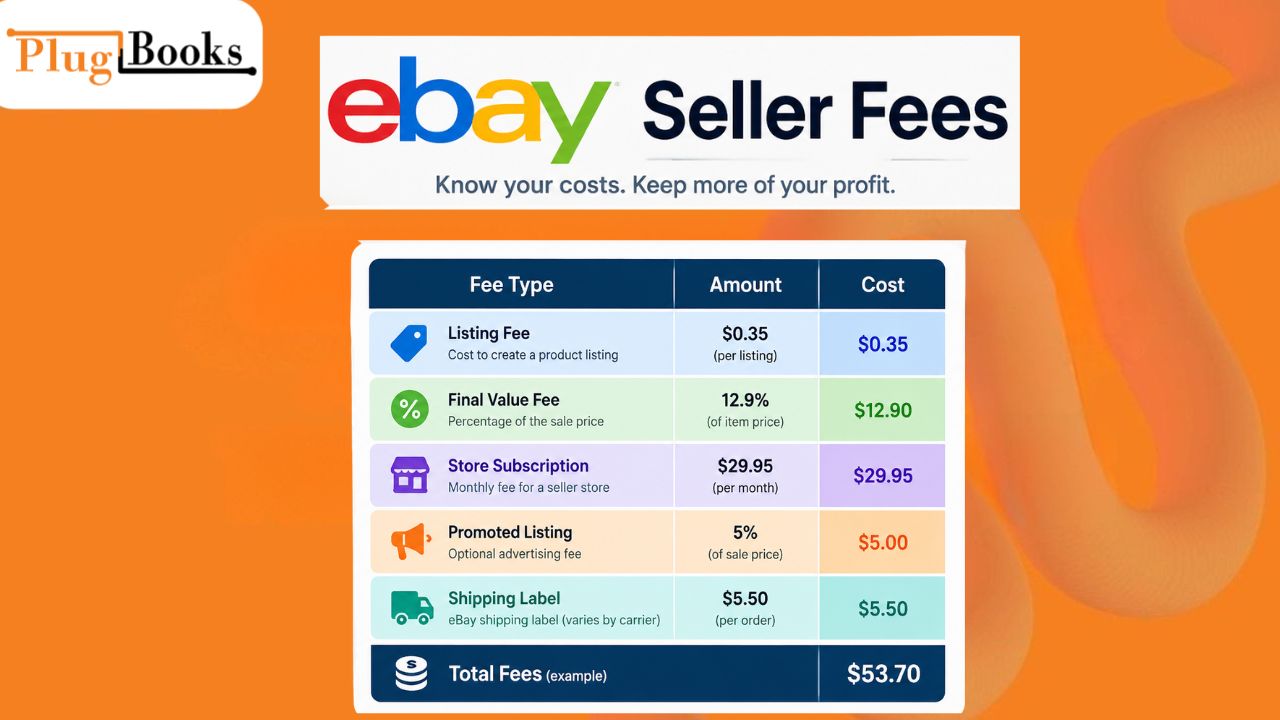
eBay Seller Fees can have a direct impact on how much you actually earn from each sale. Listing expenses, transaction charges, Store subscriptions, advertising, shipping, and other deductions can reduce your final payout.
Understanding these costs before setting your prices helps you calculate profit margins more accurately and avoid surprises when your payment arrives. Whether you sell a few products or manage a large catalog, knowing how eBay marketplace costs work can help you make smarter pricing and inventory decisions.
Understanding the Costs Behind Selling on eBay
There is no single charge that applies to every seller or every product. Your total selling expenses can vary according to the product category, listing format, sales volume, Store plan, seller performance, and transaction details.
The main charges sellers should understand include:
- Insertion fees: Charges that may apply when you create listings after using your available free-listing allowance.
- Final value fees: A percentage-based charge applied when an item sells, along with a per-order fee.
- Store subscription costs: Recurring charges for sellers who choose an eBay Store plan.
- Optional listing expenses: Charges for selected promotional or visibility features.
- International selling costs: Additional charges that can apply to qualifying cross-border transactions.
These expenses can make a noticeable difference to your final margin, especially when you sell products at competitive prices.
How Managed Payments Change the Way Sellers Are Charged
eBay’s managed payments system handles buyer payments and marketplace deductions within the platform.
When an order is completed, applicable charges are deducted before the remaining funds are sent to the seller’s payout account. This means the amount deposited into your bank account may be lower than the amount paid by the customer.
For example, a customer may pay $100 for an order, but the seller does not necessarily receive the full $100. Applicable marketplace charges, refunds, advertising expenses, shipping-label costs, or other deductions can reduce the payout.
This system gives sellers one place to review payments and deductions, but it also makes it important to understand exactly what is being taken from each transaction.
What You Pay to Create an eBay Listing
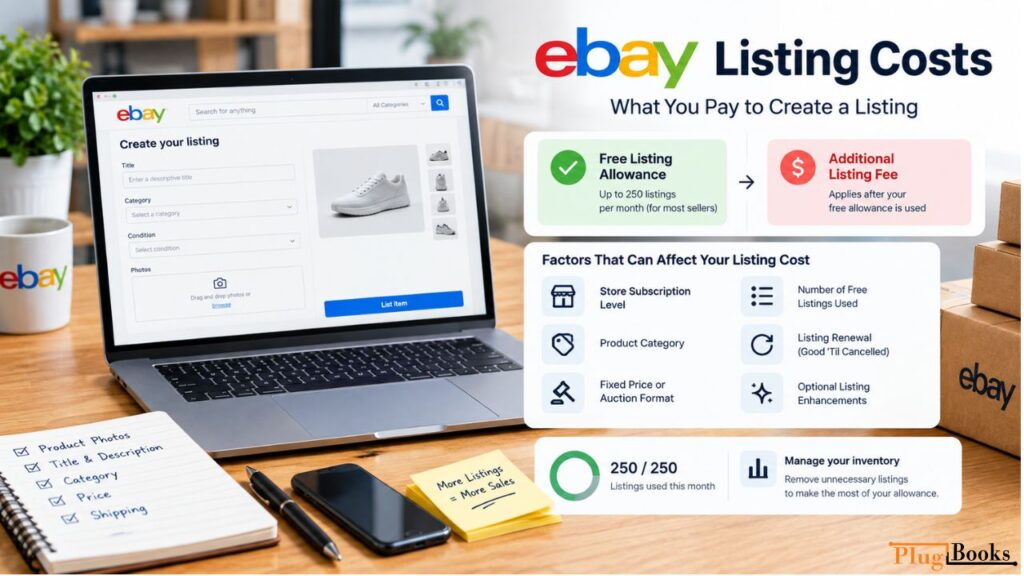
An insertion fee is associated with creating a listing when you have used your applicable free-listing allowance.
For most sellers on eBay.com, up to 250 listings can currently be created without an insertion fee each month. Store subscribers may have different allowances depending on their subscription and category.
After the applicable allowance has been used, additional listings may carry a charge.
This can become important for sellers with large inventories. Publishing hundreds or thousands of products every month can create significant overhead even before those products generate sales.
What Determines the Cost of Publishing a Listing?
Several factors can affect the expense associated with creating or renewing a listing:
- Store subscription level
- Product category
- Fixed-price or auction format
- Number of free listings already used
- Listing renewal
- Optional listing enhancements
Good ‘Til Cancelled listings also need attention because they automatically renew until the product sells or the seller ends the listing.
Optional features can create additional charges as well. Sellers should consider whether a paid enhancement is likely to generate enough additional exposure or sales to justify its cost.
Factors That Can Influence Your Listing Expense
Your inventory strategy can have a direct effect on listing costs.
A seller with a small, focused catalog may stay comfortably within the monthly allowance, while a high-volume merchant can reach the limit quickly.
Regularly review slow-moving products, duplicate listings, and outdated inventory. Removing unnecessary listings can help you make better use of your available allowance.
What Happens When Your eBay Item Sells?
The final value charge is usually one of the largest marketplace expenses because it applies after an item is sold.
The percentage depends mainly on the category in which the product is listed. Different product groups can have different rates, so sellers should never assume that one percentage applies to their entire catalog.
For many categories on eBay.com, the current rate is 13.6% on the portion of the total sale up to $7,500. Some categories have different rates, and a separate percentage may apply to amounts above the relevant threshold.
A per-order charge also applies. eBay currently lists $0.30 for orders of $10 or less and $0.40 for orders above $10.
Since marketplace rates can change, sellers should check the current fee schedule for their specific category before using a figure in long-term pricing calculations.
How the Transaction Charge Is Worked Out
The amount used to calculate the transaction charge can include more than the item’s advertised price.
Depending on the transaction, it may include:
- Product selling price
- Shipping paid by the buyer
- Handling charges
- Applicable taxes
- Other qualifying amounts
The product category is particularly important because rates differ across product groups.
Seller performance can also influence costs. Sellers who fall Below Standard may face an additional final value charge.
That makes accurate listings, reliable fulfillment, timely shipping, and good customer service important for both account health and profitability.
Are eBay Store Subscriptions Worth the Cost?
An eBay Store subscription is optional, but it can be useful for sellers who maintain a large catalog or regularly exceed their standard listing allowance.
The right plan depends on your actual inventory volume, listing frequency, and the benefits you use.
A more expensive subscription is not automatically better. Compare the monthly subscription price with potential listing savings and other benefits before upgrading.
What Do You Get With an eBay Store?
An eBay Store provides sellers with a dedicated storefront and access to subscription-based selling benefits.
Current Store levels include:
- Starter
- Basic
- Premium
- Anchor
- Enterprise
Each plan has its own pricing, listing allowances, and benefits.
For sellers with a growing inventory, a Store subscription can provide additional included listings and potentially lower the cost of listings beyond the included allowance.
How Store Membership Can Lower Your Selling Costs
Store membership can change the number of listings included with your plan and the rates charged for additional listings.
The best way to choose a plan is to look at your actual monthly listing activity.
For example, a seller who publishes only a small number of products may not benefit from a high-tier subscription. A seller managing thousands of active listings may find that the additional benefits justify the recurring cost.
Comparing Listing Costs Across Store Plans
The following table provides a simplified comparison of listing costs. Actual allowances and rates can vary according to current eBay terms, category, and listing format.
| Store Level | Listings Included Monthly | Fixed-Price Charge After Allowance | Auction Charge |
| No Store | 250 | $0.35 | $0.35 |
| Starter | 250 | $0.30 | $0.30 |
| Basic | 1,000 | $0.25 | $0.25 |
| Premium | Higher allowance | Lower rate | Lower rate |
| Anchor | Higher allowance | Lower rate | Lower rate |
| Enterprise | Highest allowance | Lower rate | Lower rate |
Before upgrading, compare your actual listing volume with the subscription price. A Store plan should make financial sense based on how you sell, not simply on the number of features it offers.
How Store Plans Can Influence Transaction Rates
Store membership can also affect applicable final value rates in qualifying categories.
However, the potential savings vary depending on the category, subscription level, fee structure, and applicable limits.
Sellers should therefore review the current fee schedule for the categories they actually sell instead of assuming that every transaction receives the same reduction.
Additional Charges Sellers Should Understand
Listing and transaction costs are only part of the expense involved in running an eBay business.
As your order volume increases, additional charges can become more noticeable.
When You Can List Without an Insertion Charge
eBay provides sellers with a monthly allowance of listings that can be created without an insertion charge.
For most sellers on eBay.com, the standard allowance is currently up to 250 listings per month. Store subscribers can receive different or larger allowances.
Once the applicable allowance is exhausted, additional listing charges may apply.
It is important to remember that a free listing does not mean the completed sale is free. Transaction charges and other applicable expenses can still reduce your payout.
What Happens When a Buyer Opens a Dispute?
A payment dispute can result in an additional expense if eBay determines that the seller is responsible.
The current dispute fee is $20 per dispute, excluding sales tax. Eligible sellers may receive protections that prevent this charge from applying.
Keeping accurate tracking details, product descriptions, order records, and buyer communication can help you handle disputes more effectively.
What Extra Costs Can Apply to International Orders?
International selling can help you reach customers in additional markets, but cross-border transactions may involve extra expenses.
For eligible US sellers, eBay currently lists an international fee of 1.65% when applicable if the seller is not using eBay International Shipping.
Currency conversion, customs duties, taxes, and destination-specific requirements may also affect the overall cost of an international order.
Before expanding into international markets, calculate the complete cost of fulfilling overseas orders instead of focusing only on additional sales.
A Quick Look at eBay Selling Costs
Several different expenses can affect the money you actually keep from a sale.
| Expense Category | When It Can Apply | Primary Cost Factor |
| Listing charge | New or renewed eligible listings | Free allowance and Store plan |
| Transaction charge | After an item sells | Category and total sale amount |
| Per-order charge | Qualifying completed orders | Order value |
| Store subscription | Recurring billing | Selected Store level |
| Listing enhancement | Optional feature selected | Type of upgrade |
| International charge | Eligible overseas sales | Location and shipping method |
| Dispute expense | Seller-responsible disputes | Case result |
| Advertising cost | Qualifying promoted transactions | Campaign settings and attributed sales |
Your real cost per order is therefore broader than the percentage shown in a fee table.
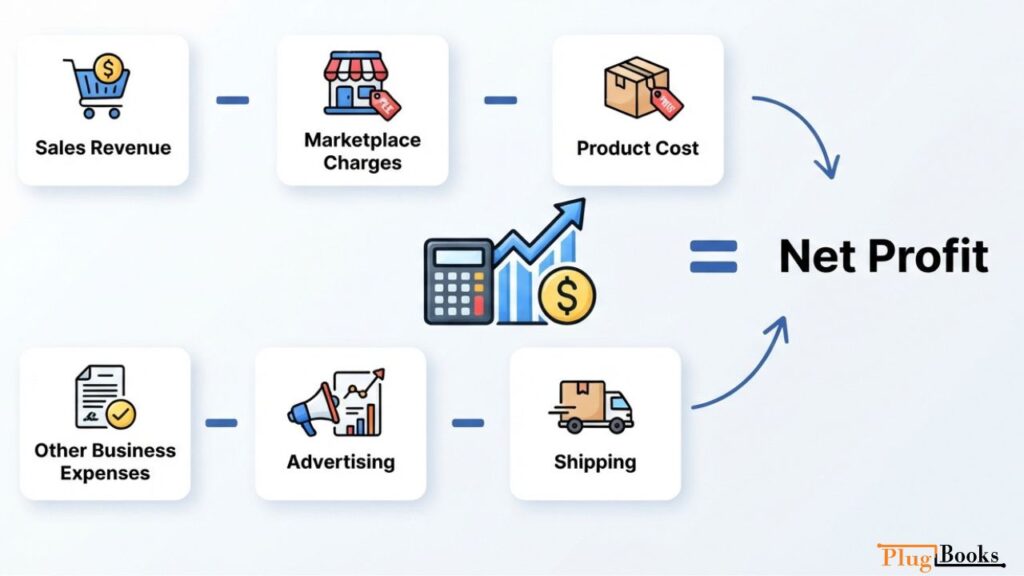
A simple profitability formula is:
Net Profit = Sales Revenue − Marketplace Charges − Product Cost − Shipping − Advertising − Other Business Expenses
Using this calculation gives you a more realistic view of your actual margin.
Practical Ways to Keep Selling Costs Under Control
Reducing expenses does not mean avoiding every paid service. The better approach is to identify which costs have the greatest effect on your margins.
Make Better Use of Your Free Listing Allowance
Review active inventory before creating new listings.
Remove outdated products, improve weak listings, and avoid unnecessary duplicates that use your monthly allowance without generating meaningful sales.
Pick a Store Plan Based on Your Actual Volume
Review your average monthly listing count and compare the potential savings with the subscription price.
If your catalog is small, a basic option may be enough. Larger inventories may justify a higher Store tier.
Be Selective With Paid Listing Features
Optional visibility tools can help certain products gain attention, but they also increase expenses.
Test paid features on products where additional exposure has a reasonable chance of producing profitable sales.
Factor International Charges Into Your Pricing
When selling internationally, include shipping, currency conversion, applicable marketplace charges, taxes, and other relevant costs in your pricing calculations.
Keep a Complete Record of Marketplace Expenses
Do not judge your business using sales revenue alone.
Track transaction deductions, listing expenses, advertising, shipping, refunds, returns, product costs, and other operating expenses to understand your actual profit.
Protect Your Seller Performance
Seller performance can influence your costs.
Accurate product information, timely shipping, clear communication, and compliance with marketplace policies can help protect both your seller account and your margins.

Managing eBay Seller Fees With PlugBooks
As order volume grows, manually tracking marketplace income and expenses becomes increasingly difficult.
A seller may have hundreds of orders, refunds, shipping expenses, advertising charges, and marketplace deductions appearing throughout the month.
PlugBooks helps e-commerce sellers organize marketplace transaction data and connect it with their accounting workflow.
How PlugBooks Helps Organize Marketplace Transactions
Instead of manually checking individual transactions and matching every deduction, sellers can automate data syncing and create a clearer financial picture.
This makes it easier to separate:
- Gross sales
- Marketplace charges
- Payouts
- Refunds
- Product expenses
- Operating costs
- Actual profit
The goal is not simply to record how much money reached your bank account. It is to understand how gross revenue turns into your actual business income.
What You Can Track With PlugBooks
PlugBooks can help sellers:
- Organize eBay transaction information
- Monitor marketplace expenses
- Reconcile payouts
- Separate revenue from selling costs
- Review profitability
- Reduce manual bookkeeping
- Maintain organized accounting records
For a growing e-commerce operation, cleaner financial data makes it easier to identify profitable products, control unnecessary expenses, and make better pricing decisions.

Final Takeaway
Understanding eBay Seller Fees is essential for anyone who wants to run a profitable eBay business.
Listing expenses, final value charges, Store subscriptions, advertising, disputes, and international costs can all reduce your final margin. Looking at these expenses together gives you a clearer picture of what each sale is actually worth.
The goal is not to eliminate every charge. Instead, understand what you are paying, determine which expenses provide value, and include unavoidable costs in your pricing strategy.
As your store grows, organized accounting becomes equally important. Accurate transaction records and automated financial data can reduce manual work while giving you a better view of your business performance.
Always check eBay’s latest official fee schedule before publishing fee figures or changing your pricing because rates, allowances, and seller benefits can change.
2 thoughts on “eBay Seller Fees: The Definitive Guide for 2026”